Most "apps for China" lists are padded with twenty things you'll never open. The truth is that about six apps decide whether your trip runs smoothly, and the rest is noise. Here's the short, real list — what each one is actually for, which work in English, and the order to set them up.
AlipayPayment
WeChatPay + chat
Apple Maps / AmapMaps
DiDiRide-hailing
Google TranslateTranslation
PlecoDictionary
Trip.comBooking
KlookTickets
Logos are the trademarks of their respective owners, shown only to identify each app. China Travel Radar is not affiliated with, endorsed by, or sponsored by any of them. The remaining icons are our own.
## Download these before you fly — not on arrival
This is the rule that saves trips. Once you land, the firewall blocks many app-store downloads and most VPN sites, and some Chinese apps geo-restrict installs. Set everything up at home on your own Wi-Fi: install, create accounts, link your card, and run one test. Arriving with a working payment app and map is the difference between a smooth first hour and standing at the airport unable to book a car.
## Payment: Alipay and WeChat Pay (the two you cannot skip)
China runs on QR-code payments. The good news for 2026: you no longer need a Chinese bank account — both apps let you **bind a foreign Visa/Mastercard directly** ("外卡内绑"). Set this up before departure; some foreign banks decline the first link, so test it early.
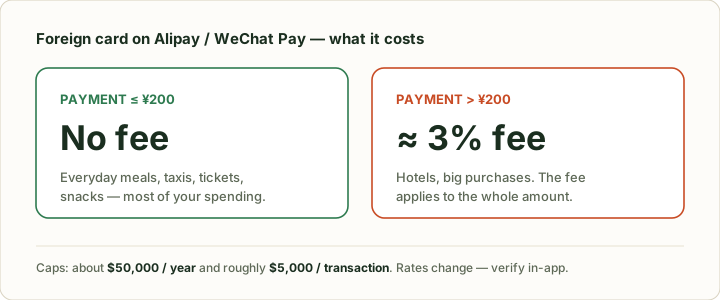
The fee structure is worth knowing so it doesn't surprise you: a foreign-card payment of **¥200 or less carries no fee; above ¥200 you pay roughly 3%**, with an annual cap around **$50,000** and a single-transaction limit near $5,000. For most travelers that means small daily spending is free and only big purchases attract the fee. Alipay's app now runs in 16 languages including English, German, Italian, Spanish and French, so the interface won't fight you.
> "International bank card users can receive a waiver of the 3% transaction fee on transactions under 200 yuan, and first-time card linkers may receive a 60-day waiver on daily transactions under 1,000 yuan."
> — [Payment services for foreigners, Beijing Municipal Government](https://english.beijing.gov.cn/specials/paymentservices/news/202505/t20250528_4100629.html)
That this works is not a niche trick anymore — over the 2026 Spring Festival, inbound spending via Alipay's foreign-card and overseas-wallet services rose **more than 60% year-on-year**, with foreign-tourist spend up roughly **4×** and "tap-to-pay" at Shanghai Pudong airport up **25×**.
Small spends are free; the ~3% fee only kicks in above ¥200. Set up "bind a foreign card" before you fly.
## Maps: why Apple Maps works and Google Maps doesn't
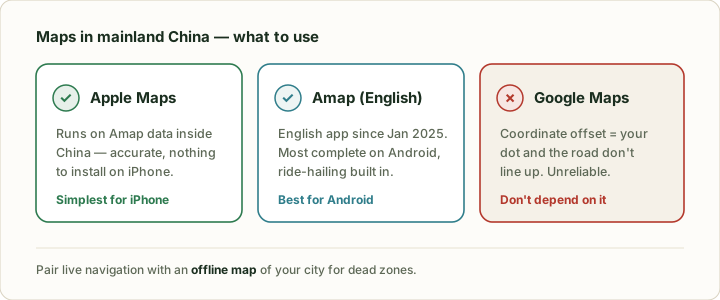
Here's the part that trips up first-timers. **Google Maps is unreliable in mainland China** — it suffers from the mandated coordinate offset, so your blue dot and the roads don't line up. Don't depend on it.
What to use instead:
- **Apple Maps (iPhone):** inside China it quietly switches to **Amap (高德) data**, which is accurate and current. For most iPhone users this is the simplest answer — nothing to install.
- **Amap, English version:** Amap shipped an English app (listed as "Amap") in **January 2025**. It's the most complete option for Android, with accurate local routing and built-in ride-hailing.
Apple Maps (iPhone) or the Amap English app both work; Google Maps drifts. Add an offline map for dead zones.
A practical combo: Apple Maps or Amap for live navigation, plus an **offline map** (download your city area in advance) as a backup for dead zones.
## Ride-hailing: DiDi, in English
**DiDi** is China's Uber, and it has a **multi-language (English) interface** — you can book taxis and private cars without a word of Chinese. It pairs with your Alipay/WeChat payment, so once those are set up, getting a car is the easy part. You can also hail directly inside Amap. This is your default for any trip longer than a short walk; flagging street taxis is harder when you can't explain the destination.
## Messaging: WeChat is more than chat
**WeChat (微信)** is worth installing even if no one back home uses it. In China it's the social layer for everything — restaurants, tickets, and small vendors often expect a WeChat scan, and locals you meet will swap WeChat, not phone numbers. It also carries WeChat Pay, so it does double duty. **WhatsApp, Messenger and Telegram are blocked**, so if you need those, you're back to a roaming eSIM or [a VPN](/en/vpn/).
## Translation: what actually works offline
Don't assume Google Translate will be there — it's flaky behind the firewall. Set up translation that survives a dead connection:
- **Google Translate** with the **Chinese language pack downloaded for offline use** before you fly (camera mode is great for menus).
- **Pleco** — the dictionary serious learners use; fully offline, excellent for characters.
- **Baidu Translate** as a local fallback.
Camera translation (point at a menu or sign) is the single most useful feature day to day.
## Getting online: eSIM and a VPN on standby
None of the above matters without data. The clean setup: an **international roaming eSIM** so blocked apps work on your phone with no VPN needed, and a **VPN** installed as backup for hotel Wi-Fi and laptops. Both have to be sorted before arrival. See our guides: [best eSIM for China](/en/esim/) and [do you need a VPN in China](/en/vpn/).
## Booking: Trip.com over the Chinese Ctrip
For hotels and trains in English, use **Trip.com** (the international app) rather than the China-only Ctrip (携程) — Ctrip requires you to filter for "foreigner-accepting" (可接待外宾) properties, while Trip.com handles that. **Klook** is the other useful one: attraction tickets, airport transfers, and eSIMs in one English app, often skipping the ticket queue.
## The Android / Google Play trap
If you use Android, note that **Chinese-market phones ship without Google Mobile Services**, but that's not your problem — *your* phone keeps its Play Store. The real catch is the reverse: a few Chinese apps restrict downloads by region. The fix is the same rule as everything else here — **install the Chinese apps (Alipay, Amap, DiDi, WeChat) from your home app store before you travel**, while everything still works normally.
## The essential apps checklist
| App | Category | Works in English? | Get it before you fly? |
|---|---|---|---|
| **Alipay** | Payment | Yes (16 languages) | ✅ Yes — link card early |
| **WeChat / WeChat Pay** | Payment + chat | Partly | ✅ Yes |
| **Apple Maps / Amap** | Maps | Yes | ✅ Yes (Amap) |
| **DiDi** | Ride-hailing | Yes | ✅ Yes |
| **Google Translate / Pleco** | Translation | Yes | ✅ Yes — download offline pack |
| **Trip.com / Klook** | Booking | Yes | Recommended |
| **eSIM + VPN** | Connectivity | Yes | ✅ Yes — mandatory |
## What you can skip
You don't need food-delivery apps (Meituan/Eleme are hard without a Chinese number and address), and you don't need a pile of "travel" apps. Payment, maps, a ride app, WeChat, translation, and connectivity cover ~95% of what a visitor does. Add anything else only when a specific need comes up.
## Sources
- [Amap debuts English navigation app for international tourists (Jan 2025) — China Daily](https://global.chinadaily.com.cn/a/202501/23/WS679200b3a310a2ab06ea8f0c.html)
- [Apple Maps in China uses Amap mapping data — Apple Legal](https://www.apple.com/legal/privacy/data/en/apple-maps/)
- [WeChat Pay exempts the 3% fee on international-card purchases under ¥200 — Beijing Municipal Government](https://english.beijing.gov.cn/specials/paymentservices/news/202505/t20250528_4100629.html)
- [Amap launches China's first multilingual map, 14 new languages — People's Daily](https://en.people.cn/n3/2025/0714/c90000-20339734.html)
 AlipayPayment
 WeChatPay + chat
 Google TranslateTranslation
 KlookTickets