# How to use DiDi in China

Source: [China Travel Radar](https://chinatravelradar.com/en/didi/)

Updated: September 25, 2026


<aside class="answer-box ticket-answer">
<p><strong>Before your first ride, get three things working:</strong> a phone number that can receive verification messages, mobile data, and a payment method accepted by your chosen app. Use DiDi China or the DiDi entry inside Alipay. At an airport, check the designated pickup area before requesting a car.</p>
</aside>

<nav class="article-toc" aria-label="DiDi guide sections">
<a href="#choose-app">Choose an app</a> · <a href="#sign-in">Register</a> · <a href="#english">Switch to English</a> · <a href="#payment">Payment</a> · <a href="#book-ride">Book a ride</a> · <a href="#find-driver">Find your driver</a> · <a href="#problems">Fix a problem</a>
</nav>

<h2 id="choose-app">DiDi China app or DiDi inside Alipay?</h2>

For the standalone app, use the listing named **DiDi China: Ride Hailing**. Its developer advertises overseas-number registration, an English interface, international bank cards and translated English–Chinese messages. App names vary by store; check that the listing serves China rather than assuming a DiDi app you use in another country is the same service. [Official iPhone listing](https://apps.apple.com/us/app/didi-china-ride-hailing/id554499054).

| Start here | Best reason to choose it | Check before requesting |
|---|---|---|
| DiDi China app | You want a dedicated ride app and its English interface. | Your number receives SMS; an available payment method is set up. |
| DiDi inside Alipay | You already use Alipay for your trip. | Open the actual DiDi service and read its authorizations and payment prompts. |
| Official taxi rank | Setup has failed or you cannot stay online. | Have the hotel address in Chinese and confirm the payment method. |

In Alipay, search **DiDi** and open its service. Another documented route is **Transport → Taxi**, although the available providers and labels can differ. Do not assume every taxi tile is DiDi. Follow the selected service's login and payment prompts. The [government's visitor guide](https://english.shanghai.gov.cn/cmsres/bc/bc6ec66aeae141be891dcd66857033b2/39558e0fd5209d4fa5add1b1d6f58b6c.pdf) covers both the standalone app and wallet routes.

Prepare [Alipay with your foreign card](/en/pay/alipay-for-foreigners/) before travelling. Installing another app is optional if your existing entry works; an account that opens successfully still needs a usable payment method.

<h2 id="sign-in">1. Register with the number you can actually receive messages on</h2>

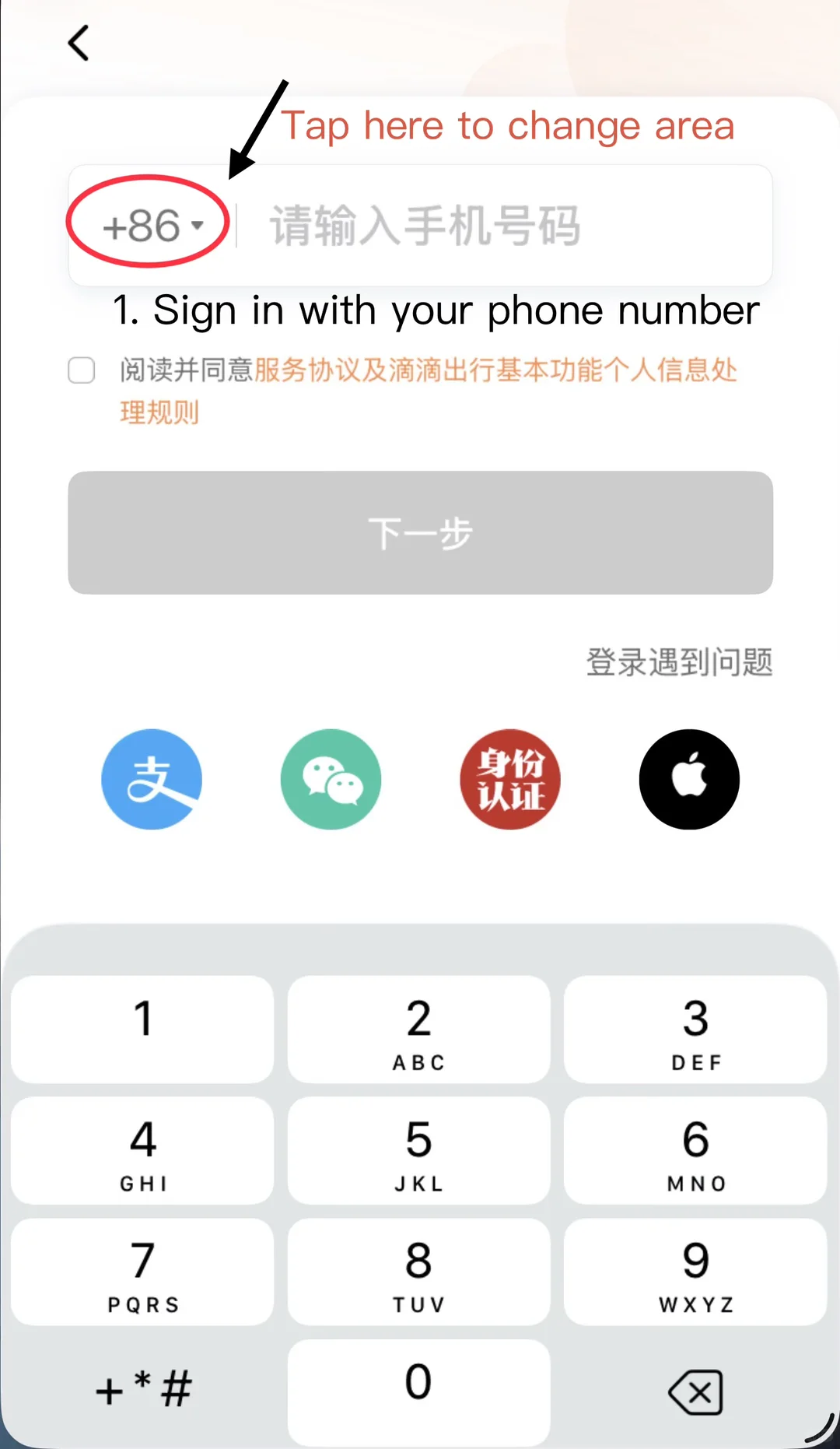
Select your phone's **country calling code**, enter your number and request the SMS code. The country code describes your phone number, not your current destination: keep your home code if that is the number you are using in China. Do not leave +86 selected for a non-Chinese number.

<div class="didi-walkthrough">
<figure class="didi-screen didi-screen--phone">
<a href="/images/guides/didi/didi-phone-country-code-xhs.webp" target="_blank" rel="noopener" aria-label="Open the phone country-code screenshot at full size"><img src="/images/guides/didi/didi-phone-country-code-xhs.webp" alt="DiDi login example with the +86 country-code selector circled before the phone-number field" width="1080" height="1862" loading="lazy" /></a>
<figcaption><strong>Country code first.</strong> The circled +86 is the selector, not a requirement to own a Chinese number. Community screenshot: <a href="https://www.xiaohongshu.com/explore/6a733d8c0000000025006db9" target="_blank" rel="noopener noreferrer">ChinaAppGuide on Xiaohongshu</a>, August 2026. Original annotations retained. Tap the image to enlarge.</figcaption>
</figure>
<div>
<h3>If the code does not arrive</h3>
<ul>
<li>Recheck the country code and number before requesting another message.</li>
<li>Keep the SIM associated with that number active. A data-only travel eSIM does not receive SMS sent to your home number.</li>
<li>Check whether your home carrier allows SMS while abroad. Wi-Fi or mobile data alone does not establish that.</li>
<li>Follow the resend timer or use the app's login-help option. If setup is blocking your trip, use a working wallet entry or the official taxi rank.</li>
</ul>
<p>Do this before departure where possible. Avoid a test ride request: reaching the booking screen is enough to inspect the setup without summoning a driver.</p>
</div>
</div>

<h2 id="english">2. Find the English interface</h2>

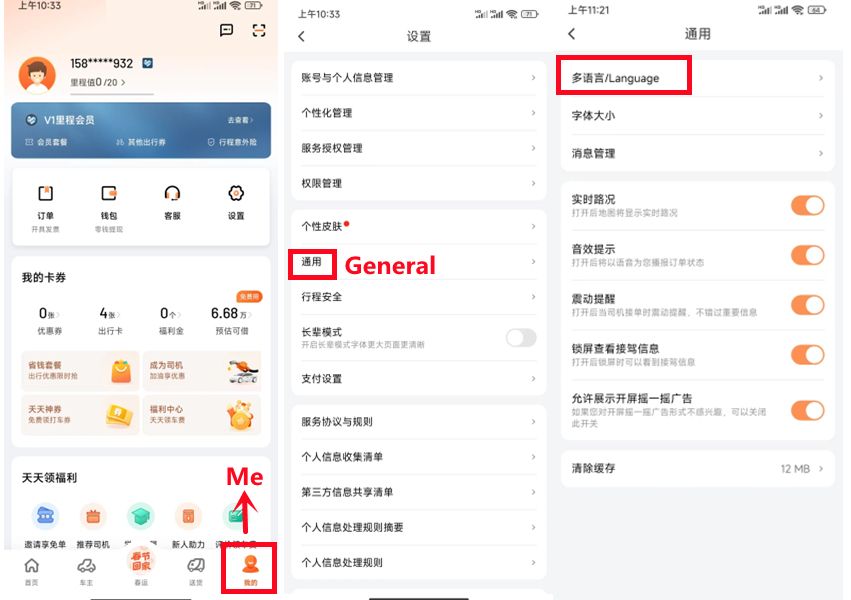
If you see Chinese menus, look for **我的 (Me) → 设置 (Settings) → 通用 (General) → 多语言 / Language**, then choose **English** and confirm. This is the route shown in Shanghai's official guide; a different version or mini-program may arrange the controls differently. The language setting can also change the services shown.

<figure class="didi-screen didi-screen--wide">
<a href="/images/guides/didi/didi-language-settings-shanghai.jpg" target="_blank" rel="noopener" aria-label="Enlarge the DiDi Me, General and Language menu screenshot"><img src="/images/guides/didi/didi-language-settings-shanghai.jpg" alt="Three DiDi settings screens highlighting Me, General and Language with red outlines" width="851" height="600" loading="lazy" /></a>
<figcaption><strong>Use the labels to orient yourself.</strong> Screenshot: <a href="https://english.shanghai.gov.cn/en-UsefulApps/20240206/976515bc601f4803b9ce2f64ae9f0cd3.html" target="_blank" rel="noopener noreferrer">Shanghai International Services</a>, guide updated July 2026. The controls may move between versions. Tap to enlarge.</figcaption>
</figure>

An English interface does not mean your driver speaks English. Use translated in-app messages for a gate, pickup bay or landmark. For map searches and place names, our [Amap guide](/en/amap/) is a separate reference.

<h2 id="payment">3. Check payment before calling a car</h2>

In the standalone app, inspect **Account / Me → Wallet → Payment Methods**, or the equivalent payment setting displayed on your version. The official app lists international bank-card support; Shanghai also lists Visa, Mastercard, Alipay and WeChat Pay. This does not guarantee approval for every card or account. [Official payment overview](https://english.shanghai.gov.cn/en-EditorsPick-ShopinShanghai/20250715/06bee10db3c14b058a380fd77e576c3f.html).

For the Alipay route, check the selected funding source and any authorization presented for that ride service. Turning on a wallet's automatic payment is a separate decision from merely adding a card. Read the confirmation screen, including any fee or verification request, before accepting.

<div class="didi-walkthrough didi-walkthrough--landscape">
<figure class="didi-screen">
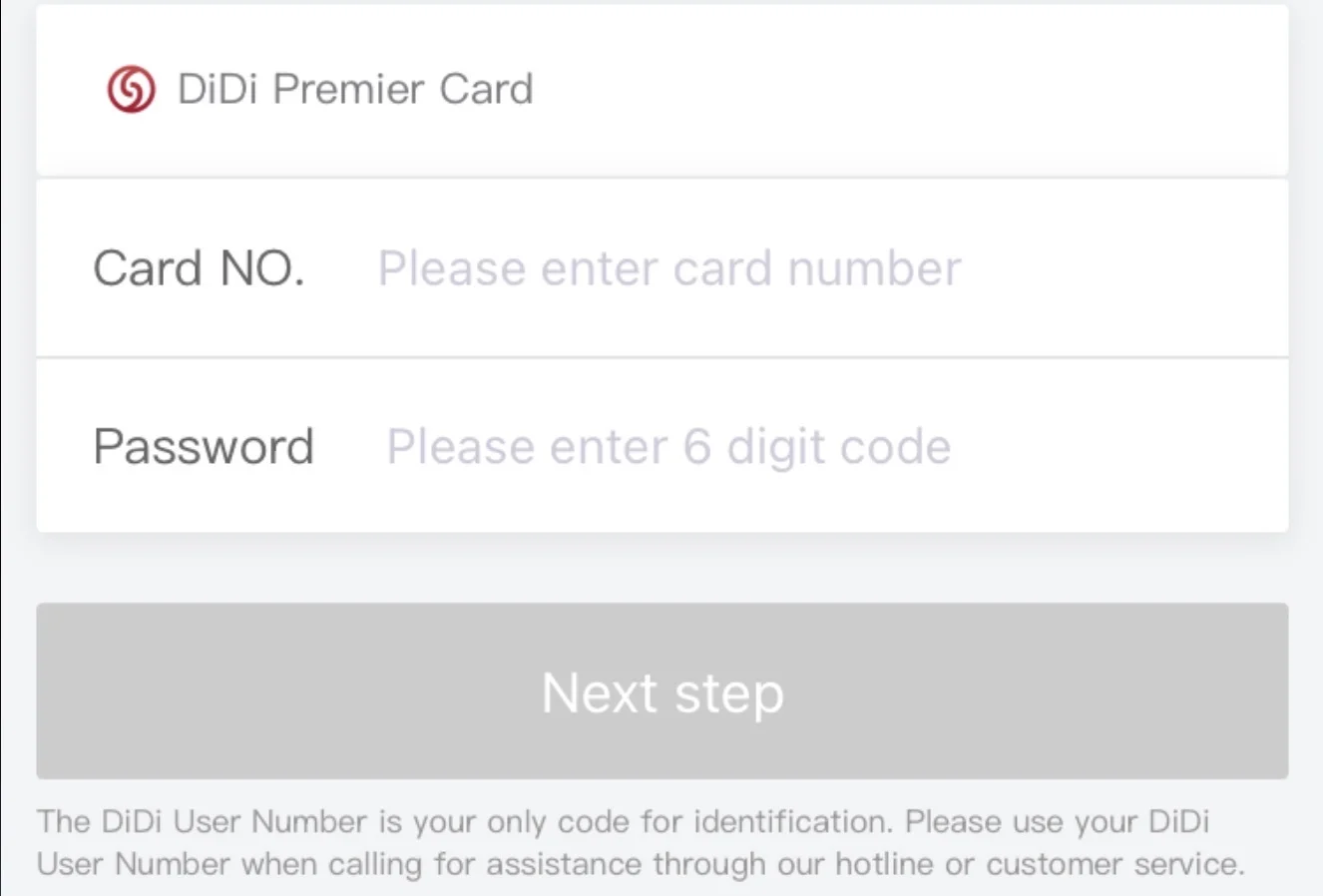
<a href="/images/guides/didi/didi-premier-card-example-xhs.webp" target="_blank" rel="noopener" aria-label="Enlarge the DiDi Premier Card screen example"><img src="/images/guides/didi/didi-premier-card-example-xhs.webp" alt="DiDi Premier Card page asking for Card No. and a six-digit password, with no personal information entered" width="1326" height="898" loading="lazy" /></a>
<figcaption><strong>This is the Premier Card form.</strong> Community screenshot: <a href="https://www.xiaohongshu.com/explore/6a733d8c0000000025006db9" target="_blank" rel="noopener noreferrer">ChinaAppGuide on Xiaohongshu</a>, August 2026. Tap to enlarge.</figcaption>
</figure>
<div><h3>Wrong card screen?</h3><p>If the heading says <strong>DiDi Premier Card</strong>, do not type your Visa or Mastercard details into it. Go back to the payment-method selector and look for the international bank-card or supported wallet option. The similar word “card” can lead you to the wrong form.</p><p>Keep a second payment route available. A saved card, a successful login and a paid ride are three different checks.</p></div>
</div>

<h2 id="book-ride">4. Choose the destination, pickup point and vehicle</h2>

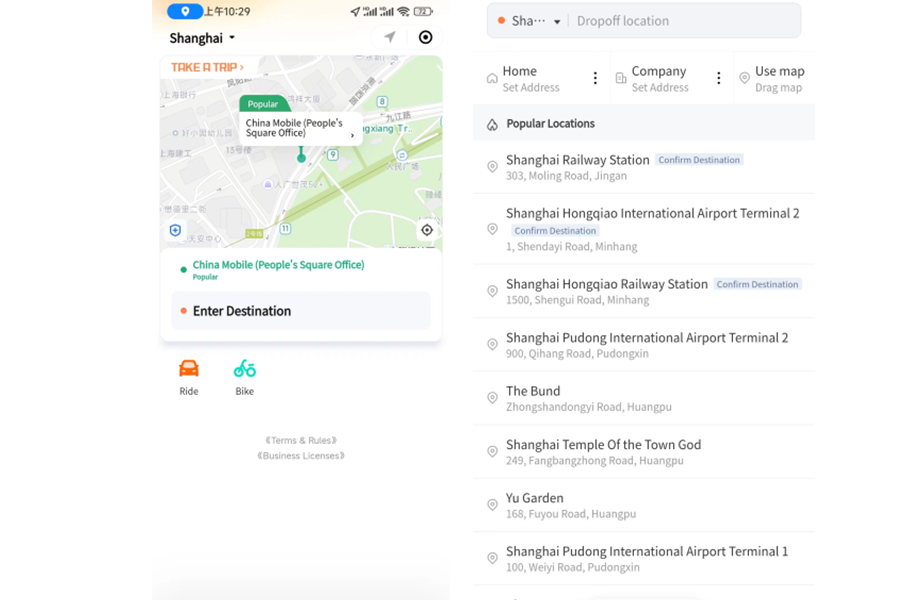
Search for your destination, then compare its full address with your hotel confirmation. Airport terminal names and railway-station names deserve a second check. If several results have the same English name, use the Chinese name and address supplied by the hotel.

<figure class="didi-screen didi-screen--wide">
<a href="/images/guides/didi/didi-destination-example-shanghai.jpg" target="_blank" rel="noopener" aria-label="Enlarge the DiDi destination-search screenshot"><img src="/images/guides/didi/didi-destination-example-shanghai.jpg" alt="DiDi mini-program example with Enter Destination and search results distinguishing Shanghai airports, terminals and railway stations" width="900" height="600" loading="lazy" /></a>
<figcaption><strong>Read the whole destination.</strong> Mini-program example from <a href="https://english.shanghai.gov.cn/en-UsefulApps/20240206/976515bc601f4803b9ce2f64ae9f0cd3.html" target="_blank" rel="noopener noreferrer">Shanghai International Services</a>. The standalone app can look different. These example locations are not a suggested route. Tap to enlarge.</figcaption>
</figure>

Before confirming a request, make a quick check:

- **Pickup:** Can you stand at that exact gate, road side, terminal level or marked bay? Your GPS location may be inside a building where a car cannot stop.
- **Destination:** Is this the correct branch, terminal or station, not just a similar name?
- **Vehicle:** Does it fit everyone and the luggage? Check any seat or child-seat requirement rather than relying on the category name.
- **Price:** Read the current quote and conditions. Adding another vehicle category can change what you agree to pay.
- **Payment:** Confirm the selected method and any advance-payment prompt. Only request a ride when you are ready to travel.

The [Beijing official walkthrough](https://english.beijing.gov.cn/livinginbeijing/transportation/202005/t20200513_1895911.html) shows how vehicle selection, matching and fare settlement can involve separate screens. Its older example fares and cancellation timers are not current promises: use your own order's terms.

<h2 id="find-driver">5. Meet the right car</h2>

After a driver accepts, compare the number plate and vehicle with your order. Use the trip's message button if the pickup location is unclear. If asked to identify the trip, check the last four digits of the phone number registered on that account; these are different from the one-time SMS code used to log in. Do not send a login code to a driver.

At an airport or large station, follow **网约车 / E-hailing** signs and the location assigned by your app. A taxi queue and an app pickup area may be in different places. For airport-specific directions, use [Beijing PEK / PKX](/en/beijing-airport/) or [Shanghai Pudong to city](/en/shanghai-pudong-airport-to-city/).

Useful messages to adapt:

| English | Chinese |
|---|---|
| I am at Gate __, level __. | 我在__号门，__层。 |
| Please confirm the pickup bay. | 请确认上车点编号。 |
| I have __ large suitcases. | 我有__个大行李箱。 |

If you cannot find each other, share the sign or bay number before changing the pickup point. Check the app's cancellation conditions before placing a replacement order. An unsolicited offer to cancel and pay outside the app needs clarification through the booking channel; do not assume the original price or support still applies.

<h2 id="finish-trip">6. Check that the ride is paid</h2>

Open the completed trip and look at its status and final charge. Depending on your setup, payment may be automatic or require confirmation. If a balance remains, use that trip's payment screen or support. Giving cash to a driver does not by itself prove the app's outstanding balance has been cleared.

If the amount is unexpected, inspect the fare breakdown and select the specific trip when contacting support. Keep the order and payment receipt together until the issue is resolved. For wider payment problems, see our [China payment backup guide](/en/pay/china-payment-backup/).

<h2 id="problems">When something goes wrong</h2>

| What you see | First check | Practical fallback |
|---|---|---|
| No SMS code | Correct country code; registered SIM active; carrier's SMS service | Login help, an already working wallet entry, or a taxi rank |
| Card cannot be added | Correct form; card details; bank verification or overseas-payment setting | Another eligible card or supported wallet |
| Driver cannot reach you | Actual gate, level and pickup pin | In-app message with the bay or sign number; ask airport staff |
| No suitable car | Available categories, luggage and displayed quote | Hotel assistance or an official taxi queue |
| Mobile data stops | Selected data SIM and plan settings | Available Wi-Fi; if no ride is booked, use a taxi rank |
| Ride says unpaid | Trip-specific balance and payment receipt | Pay through that order or contact support about a discrepancy |

An [eSIM or roaming plan](/en/esim/) supplies data; it does not automatically supply a Chinese number or complete DiDi verification. Keep the hotel name and address saved offline. If an order is already active, resolve or cancel it under its terms before switching to another car.

<h2 id="airport-transfer">When a pre-booked airport transfer is worth comparing</h2>

For a group with large bags, or an arrival where you want the meeting arrangement confirmed in advance, compare a transfer for your exact airport and hotel. Also compare the airport train and regular taxi options. A transfer is a separate booking, not a DiDi ride or a guaranteed cheaper fare.


Both linked listings state that child seats are not provided. If you need one, choose a service that confirms it can supply the right seat. Check passenger and bag capacity, flight delays, included waiting time, tolls, parking and cancellation conditions. For Daxing PKX, do not select a PEK product unless the supplier has explicitly confirmed the different airport and total surcharge.

<h2 id="sources">Sources and screenshot notes</h2>

Checked **September 25, 2026** against the linked app listing and official visitor guides. The two Xiaohongshu screenshots illustrate specific registration and card-screen details; their annotations are the original publisher's. The other two images come from Shanghai's official walkthrough. All are examples, not captures of a ride booked for this article. Open any image to inspect the original size.

We reviewed a small set of Xiaohongshu posts for practical interface problems, including the [DiDi account's English-service introduction](https://www.xiaohongshu.com/explore/67868233000000002002b9eb). We did not treat community claims such as “Express is always cheapest” or “every ride auto-pays” as universal rules. No live booking or payment was made for this guide.