# Octopus for tourists
[Read the original guide](https://chinatravelradar.com/en/hong-kong/octopus-card/)
For a short visit, choose a physical Octopus if you want the fewest setup steps. A supported iPhone can use the tourist app. Android support exists, but device, wallet and funding restrictions mean that “my phone has NFC” is not enough.
Start with your phone and payment card
| Your situation | Start here | Check before committing |
|---|---|---|
| You prefer a separate card, have children, or cannot complete wallet setup | Physical Octopus | Card type, purchase cost, included balance and collection point |
| You have a supported iPhone or Apple Watch | Octopus App for Tourists | Device support and whether your funding card is accepted |
| You use Android | Check the official Android requirements first | Device origin, Octopus Wallet eligibility and funding method |
| You only need a few MTR rides | Compare individual tickets or supported bank-card gates | Other buses, minibuses and shops may need a different payment method |
Octopus lists iPhone X or later and Apple Watch Series 3 or later for its tourist app. Physical **Sold Tourist** cards have a purchase cost, while **On-Loan** cards have a refundable deposit; neither is an unlimited travel pass. The standard sold tourist card is listed at HK$39 before stored value. [Official tourist choices](https://www.octopus.com.hk/en/consumer/tourist/choices/index.html)
**Android visitors:** the official page lists Android 12 / EMUI 13, an Octopus Wallet account and a Hong Kong-authorized-retailer device restriction. Its listed Google Pay card top-up route uses Hong Kong-issued cards. Check these requirements before transferring a physical card into a phone. A supported operating system alone does not establish eligibility. [Android requirements](https://www.octopus.com.hk/en/consumer/mobile-payment/android-octopus/about/index.html)
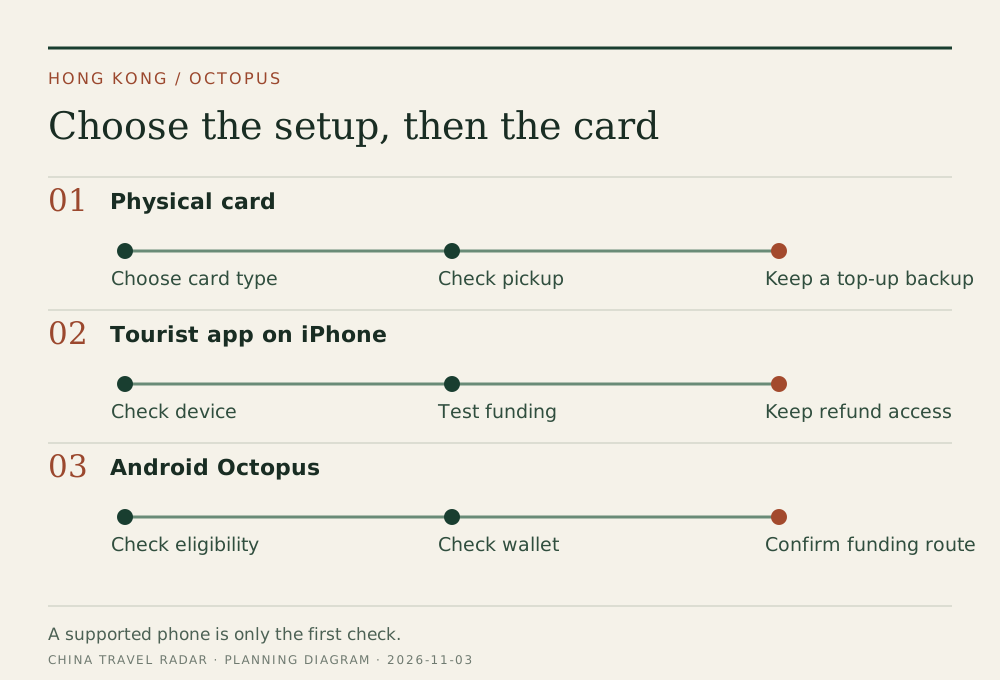
Choose the funding route before the card. This planning diagram is not an Octopus app screenshot.
Buying at the airport: sold is different from on-loan
MTR currently lists ordinary Octopus sales at its customer service centres **excluding Airport Station**. At Airport Station it lists the sold Tourist Octopus–China T-Union version instead. That explains why two travelers can report different airport purchase experiences without either having bought the same product. [MTR sales locations and card packages](https://www.mtr.com.hk/en/customer/tickets/tf_index.html)
For an advance airport-pickup purchase, check four lines in the selected package: adult or child, card cost, loaded balance, and pickup counter hours. Save the collection instructions before flying. A prepaid booking cannot help you board your first bus if its collection counter has closed.
Compare the amount you will actually spend
The checkout total may contain both the card and stored value. Use this comparison when two listings advertise different “prices”:
Upfront payment − included travel credit = amount paid before taking a ride
That remainder is not always a permanent cost: an on-loan deposit may be refundable subject to its terms. A sold card's purchase price is different. Add any refund charge separately, then consider how much unused balance you are likely to leave behind. Do not compare a loaded card with an empty card as though they were identical.
Keep purchase, top-up and payment separate
Buying an Octopus with your credit card does not mean you can recharge that physical Octopus with the same card everywhere. Likewise, having a bank card in your phone wallet does not automatically create an Octopus.
Before setting off, make a small successful top-up using your chosen supported method. Keep some Hong Kong cash or a second payment method available. For a mobile setup, test both adding value and reading the balance while you still have reliable internet and time to troubleshoot.
Use one Octopus per traveler for journeys that require entry and exit taps. Keep the same physical card or device through the journey. MTR bank-card payment is an alternative at designated gates, but it does not establish acceptance on every bus or minibus. Follow the payment logos on the actual vehicle or reader. [MTR contactless guidance](https://www.mtr.com.hk/en/customer/tickets/tf_index.html)
Before your last ride and flight
1. Keep enough value for the last transport leg before requesting a refund.
2. Identify your exact card type and its refund channel. Sold cards and mobile deposits do not follow identical processes.
3. For the tourist app, follow its refund flow; for a physical card, check the official service location and charges before queuing.
4. Keep any refund receipt until the money appears. Do not budget for an immediate bank credit.
The tourist-choice page confirms that the sold card's remaining balance can be refunded with card deactivation, and that the tourist app supports a refund request for deposit and remaining value. Check the linked product terms for your version. [Octopus tourist choices](https://www.octopus.com.hk/en/consumer/tourist/choices/index.html)
Questions that change the choice
### Do I need an Octopus for Airport Express?
No. Tickets and supported contactless payments are alternatives. Choose the station and whole hotel route first in our [Hong Kong airport transport guide](/en/hong-kong/airport-to-city/).
### Should every visitor choose mobile Octopus?
Only if setup and funding work for that person. For a family, separate physical cards may be easier to manage than several device accounts. This is a convenience choice, not a claim that one version always costs less.
### Does a Hong Kong Octopus solve Taiwan transport too?
No: do not treat it as a Taiwan EasyCard. See our [Taipei MRT and payment guide](/en/taipei-mrt/) for that separate system.
Continue planning with the [Hong Kong guide](/en/hong-kong/) or [Hong Kong–Macau transport](/en/transport/hong-kong-to-macau/).
Reviewed 3 November 2026 using the linked operator information. Photo: Victoria Harbour skyscrapers, Wikimedia Commons, CC0. Diagram: China Travel Radar. No claim of personal product testing.