You can land in China with a wallet full of cash and a Visa card and still struggle to buy a bottle of water. The country runs on QR-code payments, and the workaround everyone needs is the same: **link your foreign card to Alipay before you arrive.** Here's exactly how, plus the fees and limits nobody tells you about.
## Why cash and your credit card won't save you
Two realities hit foreign visitors fast. First, **cash is awkward**: vendors and taxi drivers routinely say they have no change. One Canadian living in China described 90% of merchants answering "we have no change" when handed cash. Second, **foreign cards are barely accepted** — outside hotels and big stores, most small merchants only take QR-code payment, and many quietly refuse a foreign card even when they have a terminal.
So the fix isn't "bring more cash" — it's getting onto the same rails everyone else uses: Alipay or WeChat Pay.
## The good news: Alipay now takes foreign cards directly
Since July 2023, Alipay and WeChat Pay opened up to international cards, and the experience has improved every year since. As Alipay put it:
> "Overseas users coming to the mainland can download Alipay and bind their overseas-issued credit card — no currency exchange needed — to enjoy convenient digital payment in cities, towns and streets."
> — Alipay, via [知乎 / Zhihu summary](https://zhuanlan.zhihu.com/p/645927543)
You register with your **home** phone number and link your own card. No Chinese SIM, no Chinese bank account.
## What you need before you start
- A valid **passport** (for identity verification).
- A supported **international card** (see below).
- A **working phone number** from your home country to receive the registration code.
- **Data** — set this up on home Wi-Fi before departure (see our [China eSIM guide](/en/esim/) for getting online on arrival).
## Which cards work — and which don't
Supported: **Visa, Mastercard, JCB, Discover, Diners Club**.
Not supported: **American Express** — neither Alipay nor WeChat Pay accepts Amex for foreign-card binding. If Amex is your only card, that's a problem to solve before you go.
Note your foreign bank must **authorize** the link; some banks flag the first attempt as suspicious, so be ready to approve it in your banking app.
## How to set it up, step by step
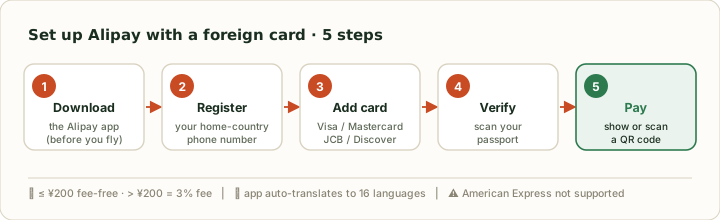
Do steps 1–4 at home on Wi-Fi; only step 5 happens in China.
1. **Download Alipay** from your app store before departure.
2. **Register** with your home-country phone number.
3. **Add your card** under the bank-card section (Visa / Mastercard / JCB / Discover).
4. **Verify your identity** by scanning your passport.
5. In China, **pay** by showing your QR code or scanning the merchant's.
## The fee rule: free under ¥200, 3% over
This is the one number worth memorizing. For foreign-card payments:
- **¥200 or under: no fee.**
- **Over ¥200: a 3% service fee** set by the card networks, not Alipay.
In practice, most street food, taxis, metro and convenience-store spending falls under ¥200 and costs you nothing extra. The 3% only bites on bigger purchases — so for a ¥1,500 hotel night, consider whether paying the hotel directly by card is cheaper.
## Spending limits
There are caps on foreign-card spending, and they've been **raised repeatedly** to court tourists (single-transaction and annual limits both went up sharply in 2024–2026).
As of 2026, the headline caps are **¥35,000 (about US$5,000) per single transaction** and roughly **US$50,000 per year**, shared across all Alipay accounts tied to your passport. Small everyday spending is unaffected, but you may be asked to verify your passport once your cumulative spend passes a threshold (around US$500–2,000 for unverified accounts). These limits have only been raised as China courts tourists — check the in-app figure if you're planning a big-ticket purchase.
For a normal leisure trip you're very unlikely to hit these — they matter mainly for big-ticket shopping.
## Alipay vs WeChat Pay — which should you install?
Both now work with foreign cards and behave almost identically (same card networks, same ≤¥200 fee-free rule). Practical differences:
| | Alipay | WeChat Pay |
|---|---|---|
| Foreign cards | Visa, MC, JCB, Discover, Diners | Visa, MC, JCB, Discover, Diners |
| Built-in translation | 16 languages, auto by app language | More limited |
| Doubles as | Maps, rides, tickets mini-programs | Messaging (WeChat) |
| Best as your | **Primary** for tourists | Backup / if friends use WeChat |
For most short-term visitors, **install Alipay first** and add WeChat Pay as a backup.
## An underrated detail: it's already in your language
When a foreign user downloads Alipay, it opens **in their own language** — Alipay supports **16**, including French, German, Italian, Spanish, Portuguese, Russian, Korean, Japanese, Thai, Indonesian and more. Payment screens, and even a built-in translation tool for menus and signs, show up in your language, not Chinese.
## What foreign-card Alipay can't do
Set expectations: with a foreign card linked, you can **pay merchants**, but you **cannot**:
- Send **transfers** to other people (P2P).
- Send or receive **red packets** (hongbao).
- Top up certain China-only services that require a domestic bank account.
It's a payment tool for buying things — not a full Chinese wallet.
## Do it before you fly
The recurring theme: **set Alipay up at home, on Wi-Fi, before you land.** Downloading the app, registering, linking a card and passing verification all go smoother on a stable connection — and it means you can pay for your first taxi the moment you arrive. Pair it with an [eSIM installed before departure](/en/esim/) and you walk out of the airport fully functional.
## Sources
- [中国移民局:海外华人回国办理移动支付便利提示 / China NIA mobile-payment guidance (Zhihu summary)](https://zhuanlan.zhihu.com/p/694961419)
- [微信支付、支付宝完成国际银行卡服务升级 — 知乎 (fees, limits, supported cards)](https://zhuanlan.zhihu.com/p/645927543)
- [支付宝上线 16 种语言 — 知乎](https://zhuanlan.zhihu.com/p/715683812)
- [How to Use Alipay and WeChat Pay for Foreigners 2026 — RealChinaTrip](https://realchinatrip.com/blogs/payments-apps/how-to-use-alipay-and-wechat-pay-for-foreigners-setup-limits-comparison-table)