Most "best VPN for China" pages are written to sell you a VPN, so they skip the first question that actually matters: **do you even need one?** For a lot of travelers in 2026 the honest answer is "not really" — because the way you get online (a roaming eSIM vs. hotel Wi-Fi) decides it before any VPN does. This page walks the real decision, then covers VPNs for the cases where you do need one.
## Do you actually need a VPN in China?
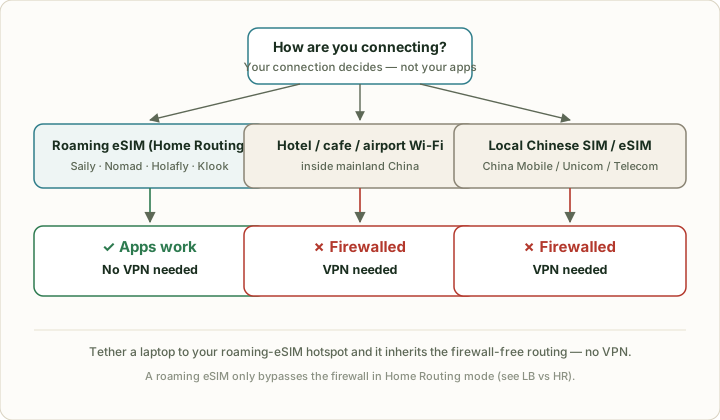
It depends entirely on *how* your data reaches the internet — not on the apps you use. There are three common setups, and only one of them is firewalled:
- **International roaming eSIM** (Saily, Nomad, Holafly, Klook…): data exits China abroad → **blocked apps work, no VPN needed.**
- **Hotel / café / airport Wi-Fi:** the connection lives inside mainland China → **firewalled, you need a VPN.**
- **A local Chinese SIM or eSIM** (China Mobile/Unicom/Telecom): routes through the domestic gateway → **firewalled, you need a VPN.**
So the real question isn't "which VPN" — it's "what am I connecting through?" Get the eSIM right and the VPN becomes optional.
The deciding factor is your connection, not your apps. Roaming eSIM data leaves China before it hits the firewall; Wi-Fi and local SIMs don't.
## What's actually blocked by the Great Firewall
The list that trips up travelers is the everyday one: **Google (Search, Maps, Gmail, Drive), WhatsApp, Instagram, Facebook, Facebook Messenger, YouTube, X/Twitter and Telegram are all blocked** in mainland China. Google Maps in particular fails — even where it loads, the location is offset, so navigation is unreliable. Plan for offline maps (Maps.me / a downloaded area) or a Chinese app as backup.
> "China's Great Firewall blocks thousands of websites and apps, including Google, WhatsApp, Instagram and YouTube. Google Maps is completely blocked, and communication apps including WhatsApp, Facebook Messenger and Telegram are all blocked."
> — [Best VPN for China 2026, vpnMentor](https://www.vpnmentor.com/bestvpns/china/)
What *isn't* blocked: Apple services (iMessage, App Store, Apple Maps), Microsoft/Bing, and most banking apps generally work. So an iPhone user on a roaming eSIM is in better shape than most guides imply.
## The shortcut most VPN guides bury: a roaming eSIM
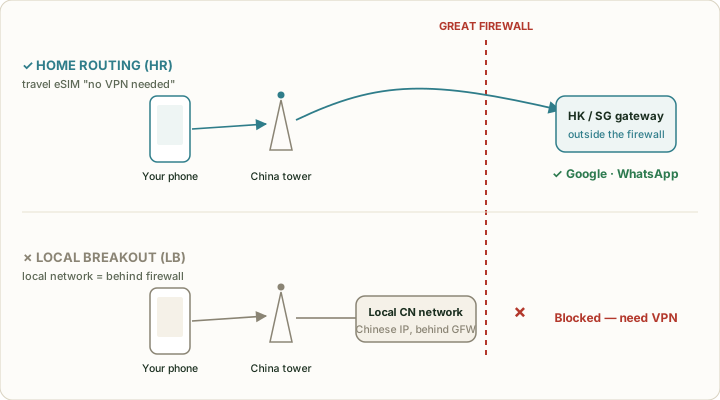
This is the single most useful thing on this page, and the brands selling VPNs rarely lead with it. An international travel eSIM connects to a Chinese cell tower, but **tunnels your data out to a gateway in Hong Kong or Singapore before it touches the open internet.** Because the traffic legally exits China first, the firewall never sees it — and blocked apps work with nothing to configure.
Chinese students returning home rely on exactly this trick: "网课卡" roaming data plans reach Google and YouTube on cellular with no VPN app at all. For a short trip, a roaming eSIM is simpler, cheaper-to-not-troubleshoot, and more reliable than a VPN — see our [China eSIM guide](/en/esim/) for which ones route abroad.
## LB vs HR: the one routing detail that decides everything
Here's the nuance even most English guides get wrong, and it's why "do I need a VPN if I have an eSIM?" has no single answer. International roaming runs in one of two modes:
- **LB — Local Breakout:** your data breaks out onto the *local* (Chinese) network. Your IP is Chinese, you're effectively behind the firewall → **blocked apps fail, you'd still need a VPN.**
- **HR — Home Routing:** your data is routed back through the carrier's *home* gateway abroad → **outside the firewall, blocked apps work, no VPN.**
A roaming eSIM only saves you from a VPN if it uses **Home Routing**. Travel eSIM brands that advertise "works in China, no VPN" are HR-routed; a plan that simply drops you on a local mainland network is LB and won't bypass anything. Most "China eSIM" pages don't print which mode they use, so confirm "routes outside China / no VPN needed" on the provider's own China page at checkout.
Same eSIM, two modes. Only Home Routing exits China — that's the version that replaces a VPN.
## When you still need a VPN
A roaming eSIM covers your phone's cellular data — and nothing else. You'll want a VPN for:
- **Hotel, café and airport Wi-Fi** — almost always inside the firewall. The moment you join hotel Wi-Fi to save data, Google and WhatsApp stop working again.
- **A laptop or tablet without its own eSIM** — unless you tether it to your phone's roaming hotspot (which *does* inherit the firewall-free routing).
- **A local Chinese SIM** — cheaper and higher-data, but firewalled by design.
- **A backup** — routing can change; carrying one VPN app is cheap insurance.
One genuinely useful detail rarely mentioned in English guides: some big-city hotels with 外宾 (foreign-guest) credentials offer direct international Wi-Fi that needs no VPN at all. Don't count on it, but it's worth asking at the front desk.
## Is using a VPN in China legal — for a tourist?
Be careful with the breezy "it's totally fine" you'll read on VPN sites; the Chinese reality is more specific. **Unauthorized personal use of a VPN to access overseas networks is technically not compliant** under Chinese rules — only approved entities (companies, institutions) can apply to use VPNs legally. That's the part the marketing pages omit.
The practical reality for visitors, though, is reassuring:
> "Prosecutions almost exclusively target Chinese residents who broadcast or publish content via VPN, not tourists who just want to check their emails or scroll through Instagram, so you won't face any real risk as a foreign traveller using a VPN on your personal phone."
> — [Can You Use a VPN in China in 2026, The Food Ranger](https://www.thefoodranger.com/can-you-use-a-vpn-in-china/)
So: a grey area on paper, not a real-world risk for a tourist on a personal device. Use a reputable paid app discreetly, don't broadcast, and you're in the same position as millions of other visitors. This is general information, not legal advice.
## Which VPNs actually work in China right now
"Works in China" is a moving target — the firewall escalates around holidays and big political dates, and a VPN that worked last month can stall this week. That's why the recency words (`2026`, month names, "right now") dominate searches. Treat any list, including this one, as "verify before you rely on it."
Prices below are mid-2026 published rates. The far-cheaper numbers are multi-year-plan equivalents; a true month-to-month plan costs much more, and promotions move constantly — confirm at checkout.
| VPN | Why it's on the list | Price (mid-2026, verify) | Notes |
|---|---|---|---|
| **ExpressVPN** | Most-cited #1 for China in mid-2026 — fastest on Hong Kong / LA servers; obfuscation survives crackdowns | ~$12.99 monthly / ≈$2.79/mo on a 2-yr plan | Easiest setup for non-techies |
| **Astrill** | Long-standing China specialist; nearby servers (Taiwan, Japan, Korea); strong anti-detection | ~$30/mo month-to-month; less on longer terms | Premium price; popular with long-stay expats |
| **NordVPN** | Obfuscated servers, reliable for short trips | ~$12.99 monthly / ≈$3.09/mo on a 2-yr plan | Also bundled inside the Saily eSIM |
| **Surfshark** | On-the-ground tested as a top pick; strong on hotel Wi-Fi / broadband (OpenVPN TCP) | from ≈$1.99/mo on a long plan | Cheapest here; unlimited devices |
**What's actually working in mid-2026:** independent China-focused testers currently put **ExpressVPN first** for speed and reliability, with **Astrill** the premium backup and **Surfshark / NordVPN** also reported working.[[The Food Ranger](https://www.thefoodranger.com/best-vpn-for-china/), [vpnMentor](https://www.vpnmentor.com/bestvpns/china/)] Because the firewall escalates around holidays and political dates, **re-check Reddit's r/chinatravel the week before you fly** — a VPN that worked last month can stall this week.
## Free VPNs for China: why they mostly fail
The data shows huge search volume for "free VPN for China" — and it's mostly a trap. Free VPNs lack the obfuscation needed to get through the firewall, get blocked fastest, throttle hard, and monetize by logging or selling your traffic. For a one-week trip the math is simple: a paid plan is a few dollars, and the failure mode of a free one is "no internet in a country where you can't download a replacement." If budget is the concern, a roaming eSIM (no VPN needed) is the cheaper *and* more reliable answer.
## Install it before you fly — this is non-negotiable
Set up your VPN at home, on your own Wi-Fi, before departure.
> "Once you're in China, the VPN websites themselves are blocked, so you won't be able to download the app, create an account, or pay for your subscription from mainland China."
> — [Best VPN for China 2026, vpnMentor](https://www.vpnmentor.com/bestvpns/china/)
Download the app, create and pay for the account, log in, and run one test connection — all before you leave. If you land without a working VPN and you're on firewalled Wi-Fi, fixing it on the ground is genuinely hard.
## How to set up a VPN for China, step by step
1. **Choose and pay for a paid VPN at home** (free ones mostly fail — see above).
2. **Install the app and log in** while still on your home network.
3. **Turn on obfuscation / "stealth" mode** if the app has it (Astrill StealthVPN, ExpressVPN auto, NordVPN obfuscated servers) — this is what gets you through.
4. **Save 2–3 nearby servers** (Hong Kong, Singapore, Japan, Taiwan) — if one is blocked, switch.
5. **Run a test connection** before you fly.
6. **In China:** connect to the VPN *before* opening blocked apps; if it stalls, switch server or protocol.
## VPN vs eSIM vs hotel Wi-Fi — which to use when
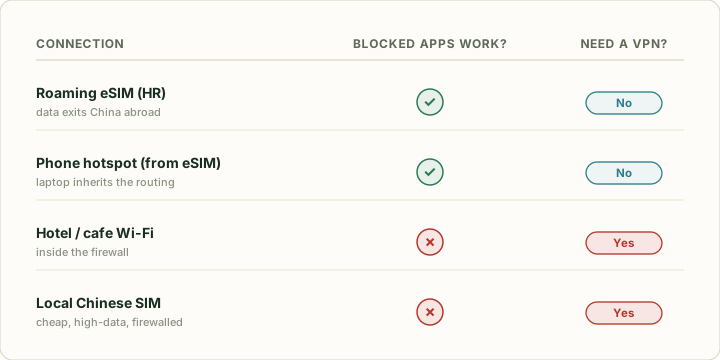
For most travelers the answer is "both, for different things": a roaming eSIM as the default, a VPN for Wi-Fi and laptops.
| Connection | Blocked apps work? | Need a VPN? | Best for |
|---|---|---|---|
| **Roaming eSIM (Home Routing)** | ✅ Yes | No | Everyday phone use, maps, messaging |
| **Phone hotspot from that eSIM** | ✅ Yes | No | Getting a laptop online firewall-free |
| **Hotel / café Wi-Fi** | ❌ No | Yes | Heavy downloads — with VPN on |
| **Local Chinese SIM** | ❌ No | Yes | Cheap, high-data — if you'll run a VPN |
The simplest plan: roaming eSIM for your phone, VPN on standby for Wi-Fi and your laptop.
## On-the-ground troubleshooting
If your VPN connects but nothing loads, work through this in order: **(1)** switch to a different nearby server; **(2)** change protocol (try the app's stealth/obfuscated mode, or switch between WireGuard and OpenVPN/IKEv2); **(3)** toggle airplane mode to re-handshake the tower; **(4)** if you're on a roaming eSIM and signal is flaky, turn off automatic carrier selection and manually lock to the carrier with the best local signal (often China Mobile in cities).
## What a VPN does NOT solve
A VPN gets you over the firewall — that's all. It does **not** get you a Chinese phone number, and it does **not** set up payments. You still need data (an [eSIM](/en/esim/)) and you still need [Alipay or WeChat Pay set up](/en/pay/alipay-for-foreigners/) to actually buy things, since cash and foreign cards are awkward almost everywhere. Sort those before you go, alongside the VPN.
## Sources
- [Best VPN for China 2026 — vpnMentor](https://www.vpnmentor.com/bestvpns/china/)
- [8 Best VPNs for China, still working June 2026 — The Food Ranger](https://www.thefoodranger.com/best-vpn-for-china/)
- [Can You Use a VPN in China in 2026 — The Food Ranger](https://www.thefoodranger.com/can-you-use-a-vpn-in-china/)
- [Astrill VPN pricing & China performance 2026 — Security.org](https://www.security.org/vpn/astrill-vpn/review/)
- [ExpressVPN / NordVPN / Surfshark 2026 pricing — Security.org](https://www.security.org/vpn/expressvpn/)