
Getting online
Best eSIM for China (2026): VPN-Free Plans, Hotspot Limits & Setup Checklist
How to choose a China eSIM that keeps Google, WhatsApp and maps working, what to verify before checkout, hotspot and QR-code traps, iPhone eSIM limits, and our testing status.
Most “China eSIM” guides make the wrong comparison. The important question is not just price per GB. It is whether the plan keeps your normal travel stack working inside mainland China: Google Maps, WhatsApp, Gmail, Instagram, Uber-style backup apps, email, translation, hotel confirmations and payment setup.
A local mainland SIM can be useful if you need a China phone number, but it routes through the domestic internet. Many foreign apps will not work unless you also have a separate VPN. A good travel eSIM usually uses international roaming. Your phone connects to a Chinese tower, while the data exits through an overseas gateway, so blocked apps can work without you running a VPN app.
Our testing status
This page is a buying checklist and desk-research comparison, not yet a speed-test ranking. We have not completed a paid, side-by-side field test of every eSIM in mainland China.
We separate three kinds of evidence:
| What we say | What it means |
|---|---|
| Provider claim | The provider says a plan has this feature on its own product page or help center. |
| Traveler report | A user or reviewer says it worked for them, but it may vary by city, phone and plan. |
| Our field test | We personally bought the plan and tested it in China. |
| Item | Status on 2026-07-06 | How to read it |
|---|---|---|
| Provider plan pages | Checked | Useful for prices, hotspot policy, activation rules and stated coverage. |
| Apple eSIM restrictions | Checked against Apple Support | Useful for device and China-mainland eSIM limits. |
| Traveler pain points | Reviewed from Chinese and English user discussions | Useful for traps: QR codes, no SMS number, hotspot limits, landing-day setup. |
| Our live China speed test | Not completed yet | Do not treat this page as a city-by-city speed ranking. |
When we publish a field test, the table will include device, city, date, carrier, speed, latency, hotspot and whether Google/WhatsApp worked without a VPN.
Do you actually need an eSIM for China?
For most short-stay visitors, yes. You need mobile data immediately for:
- calling a Didi or checking the pickup point after landing;
- opening map directions when hotel Wi-Fi is not available;
- using translation at restaurants, stations and ticket counters;
- loading email or booking confirmations;
- finishing Alipay or WeChat Pay setup;
- keeping WhatsApp, Gmail, Instagram or Google services reachable.
Your home carrier’s roaming may also work, but it can be expensive and the routing differs by carrier. Some roaming connections behave like international eSIMs and can access blocked apps; some are slower or priced poorly. Check your home carrier before assuming.
The real buying decision: local internet or roaming internet
A China eSIM can mean two different things:
| Type | How it routes data | Google / WhatsApp / Gmail | Best for |
|---|---|---|---|
| Local mainland SIM or local-data plan | Through mainland China internet gateways | Usually blocked unless you use a VPN | Long stays where you need a China number or local SMS. |
| International roaming eSIM | Uses Chinese towers but exits through an overseas gateway | Usually works without a separate VPN if the plan says so | Tourists, business travelers and anyone who needs familiar apps on arrival. |
| Roaming eSIM plus bundled VPN/security app | Roaming data plus an extra app layer | Usually works; may also help on hotel Wi-Fi | Travelers who want one provider to cover mobile data and Wi-Fi security. |
The safest checkout rule is simple: buy only if the listing explicitly says that Google, WhatsApp, Gmail, Instagram or unrestricted internet works in mainland China without a separate VPN. If the listing only says “China coverage” or “China Unicom/China Mobile network”, that is not enough.
Why a roaming eSIM can bypass the firewall
International travel eSIMs do not always use the same internet exit as a local Chinese SIM. Your phone can attach to a China Mobile, China Unicom or China Telecom tower, while the eSIM provider routes the data through a gateway outside mainland China.
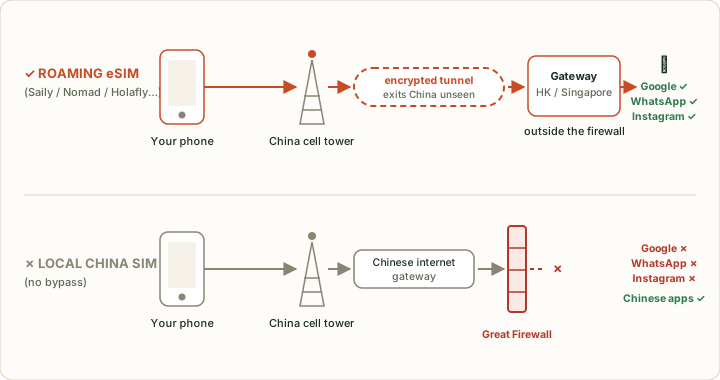
This is why two plans can both show “China Unicom” on your phone but behave differently online. One may still open Google and WhatsApp because the provider routes data outside mainland China; another may behave like a local mainland connection.
Provider comparison: what to verify before you pay
Plan details change often, so treat this as a checkout checklist rather than a permanent price chart.
| Provider type | What looks good | What to verify before buying | Best for |
|---|---|---|---|
| Saily China eSIM | Public China page says a VPN is not needed for its China eSIM; Nord Security background; fixed data and unlimited options. | Exact plan size, whether security/VPN features are included in your package, and whether hotspot is allowed. | Travelers who want an app-led setup and security features in the same ecosystem. |
| Airalo China eSIM | Widely used marketplace; many traveler reports say China plans work without a separate VPN. | Read the current China plan page/help text at checkout; confirm app access, activation policy and support response time. | Price-sensitive visitors who are comfortable checking plan details themselves. |
| Holafly China eSIM | China page sells unlimited-data plans and states 4G/5G coverage where available. | Hotspot allowance, fair-use behavior, mainland-only versus Hong Kong/Taiwan coverage, and refund terms. | Heavy phone-data users who do not want to count GB. |
| Nomad China eSIM | China page lists China Unicom / China Telecom networks, plan add-ons, data roaming setup and hotspot support. | Whether the plan explicitly supports unrestricted apps in China; plan validity and throttled speed after daily allowance. | Travelers who want capped plans, add-ons and tethering support. |
| Marketplace eSIMs (Klook, Trip.com, airport vendors) | Convenient if you are already booking tickets or transfers. | Every listing is different: app access, hotspot, QR delivery, activation start time, refund policy and support language. | Bundling, last-mile convenience or one-off short trips. |
How much data do you really need?
Most travelers should start with 10GB for a week to ten days. It gives room for maps, messaging, translation, social posting, short video clips and payment apps without paying for an unlimited plan.
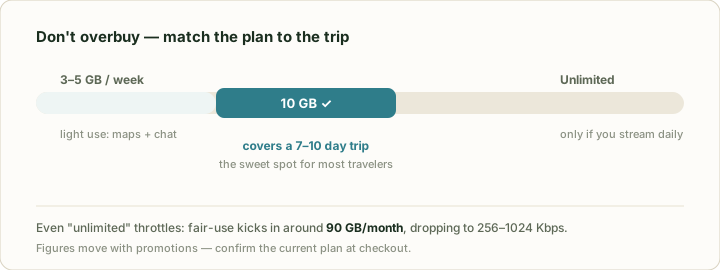
Use this rough split:
| Trip style | Sensible starting point | Why |
|---|---|---|
| Light tourist, mostly Wi-Fi at hotel | 3-5GB per week | Maps, messaging, payments and occasional browsing. |
| Normal traveler | 10GB for 7-10 days | Enough buffer for maps, photos, translation and social apps. |
| Business traveler | 10-20GB | Email, calls, tethering and document sync add up quickly. |
| Content creator or family hotspot | Unlimited or 20GB+ | Video upload and shared hotspot can burn data fast. |
Do not buy “unlimited” only because it feels safer. Check the fair-use and hotspot rules. Some unlimited plans are generous on the phone but limit sharing to a laptop or second device.
Buyer’s checklist before checkout
Before you pay, confirm these nine items on the actual plan page:
| Check | Why it matters |
|---|---|
| Blocked-app access | The page should say Google, WhatsApp, Gmail, Instagram or unrestricted internet works in mainland China without a separate VPN. |
| Data-only or phone number | Most travel eSIMs do not include a mainland China number or SMS. |
| Hotspot/tethering | Critical if you travel with a laptop, tablet or partner. |
| Activation start | Some plans start when installed; others start when they first connect in China. |
| QR-code reinstall policy | Many eSIM QR codes are one-time installs; deleting the eSIM can strand you. |
| Coverage area | Mainland China, Hong Kong, Macao and Taiwan are often separate products. |
| Top-up or add-on rules | Useful if you underestimate data. |
| Support channel | If the app fails in China, can you contact support by email, WhatsApp or in-app chat? |
| Refund policy | Especially important if your phone turns out to be locked or incompatible. |
The iPhone and phone-compatibility trap
Check device compatibility before buying any plan. You need an eSIM-capable, carrier-unlocked phone. On iPhone, look under Settings > Cellular or Mobile Service for an “Add eSIM” option. On Android, the exact path depends on Samsung, Pixel, Xiaomi, Oppo or other brands.
China adds two extra traps:
- Apple says that, in mainland China, only specific iPhone models support China-mainland eSIM activation, and activation with mainland carriers requires a supported device and a carrier store visit.
- A travel eSIM from a worldwide provider is not the same thing as a China-mainland carrier eSIM. Foreign visitors usually want the travel eSIM, installed before arrival, not a local China carrier eSIM bought after landing.
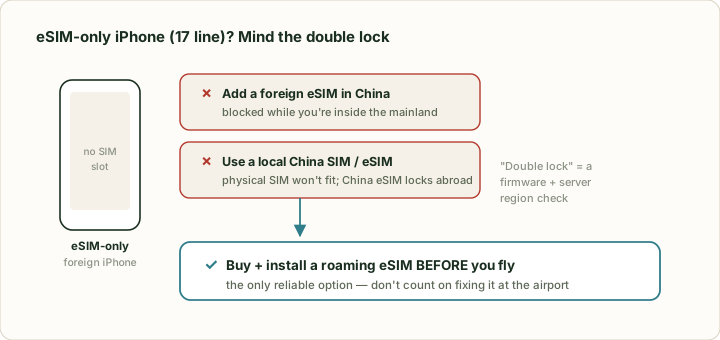
If your phone is carrier-locked, do not buy an eSIM yet. Ask your carrier to unlock it or choose pocket Wi-Fi / your carrier’s roaming instead.
Install it before you fly
Set up the eSIM at home, while you still have stable Wi-Fi and easy access to your email, app store, provider account and payment card.
Important setup rules:
- Buy the plan before departure.
- Save the QR code and manual activation code offline.
- Install the eSIM profile on Wi-Fi.
- Do not delete the eSIM profile unless support tells you to.
- Keep your home SIM active for calls/SMS if you need bank or airline codes.
- After landing, set cellular data to the China eSIM and turn on data roaming for that line.
If the eSIM says “Activating” before you arrive, that can be normal. Many travel eSIMs only finish activation when they see the destination network.
On-the-ground fixes if it does not work
Use this order. The big rule: do not delete the eSIM first.
| Symptom | Try this first |
|---|---|
| No data after landing | Turn on the eSIM line, set it as cellular data, enable data roaming, wait five minutes, then restart. |
| Signal but no internet | Check APN instructions from the provider; some plans need a manual APN. |
| Keeps switching network | Turn off automatic network selection and manually try China Mobile, China Unicom or China Telecom if your plan allows it. |
| Google works on mobile data but not hotel Wi-Fi | That is normal. The eSIM route and hotel Wi-Fi route are different. Use mobile data or a separate VPN for Wi-Fi. |
| WhatsApp or Gmail still blocked | Confirm the plan actually promises unrestricted China access; a local-data eSIM may still need a VPN. |
| Laptop hotspot does not work | Check hotspot support and any daily sharing cap. Unlimited phone data may not mean unlimited hotspot. |
Manual carrier locking is worth trying in stations, malls and high-rise areas. Phones sometimes hunt between networks; locking to the strongest one can stabilize the line.
What an eSIM does not solve
A travel eSIM solves data. It does not solve every China digital problem.
| Problem | Does a travel eSIM solve it? | What to do |
|---|---|---|
| Mainland China phone number | Usually no | Use your home number where accepted; get a local SIM only if you truly need mainland SMS. |
| SMS verification | Usually no | Keep your home SIM active or use services that support email/app verification. |
| Alipay / WeChat Pay setup | No | Set up payments separately before or right after arrival. |
| Hotel or cafe Wi-Fi blocks Google | No | The eSIM helps only when you use mobile data. Wi-Fi may still need a VPN. |
| Long-term China stay | Not ideal | Consider a local SIM and accept that you may need a VPN for foreign apps. |
For payment setup, start with How to use Alipay as a foreigner.
eSIM vs local SIM vs pocket Wi-Fi
| Option | Best for | Weak spot |
|---|---|---|
| Travel eSIM | Short trips, solo travelers, business travelers, eSIM-only phones, landing-day data. | Usually no China phone number or SMS. |
| Local physical SIM | Long stays, local SMS, China number, domestic apps. | Passport registration, store visit, foreign apps blocked without VPN. |
| Pocket Wi-Fi | Families or groups who stay together all day. | Another device to charge, pick up, return and carry. Bad if the group splits up. |
| Home-carrier roaming | Very short trips or work phones with good roaming packages. | Can be expensive; app access and speed depend on carrier routing. |
For most first-time visitors, travel eSIM plus Alipay/WeChat Pay setup is the least stressful combination.
How to set up your China eSIM, step by step
- Confirm your phone supports eSIM and is carrier-unlocked.
- Buy a China or Asia plan before departure.
- Save the QR code somewhere you can open offline.
- Install the eSIM profile on home Wi-Fi.
- Label it “China” so you do not confuse it with your home SIM.
- Keep your home SIM for calls and SMS; set the eSIM as mobile data after landing.
- Enable data roaming on the eSIM line.
- Test Google, WhatsApp, Gmail and your map app on mobile data, not hotel Wi-Fi.
- If it fails, follow the troubleshooting table before deleting anything.
Our pick - and who each option is really for
There is no single best China eSIM. The right choice depends on your trip.
| Traveler | Best fit |
|---|---|
| First-time tourist, wants familiar apps | A travel eSIM that explicitly says Google/WhatsApp work without VPN. |
| Laptop worker | A plan with clear hotspot support and enough data, not just “unlimited” phone data. |
| Heavy social/video user | Unlimited-data plan, after checking fair-use and hotspot limits. |
| Multi-country route through China, Japan and Korea | Asia or CN-JP-KR regional eSIM. |
| Needs a China phone number | Local SIM instead of travel eSIM. |
| Group that never separates | Pocket Wi-Fi can be cheaper per person. |
Sources
Affiliate link — we may earn a commission at no extra cost to you. Booking is completed on Klook.