CHINA RAIL 12306 · BOOKING GUIDE
How to book China train tickets
Book China train tickets with a foreign passport: screenshots for 12306 registration, English settings and train search, plus fixes for verification, payment and boarding.
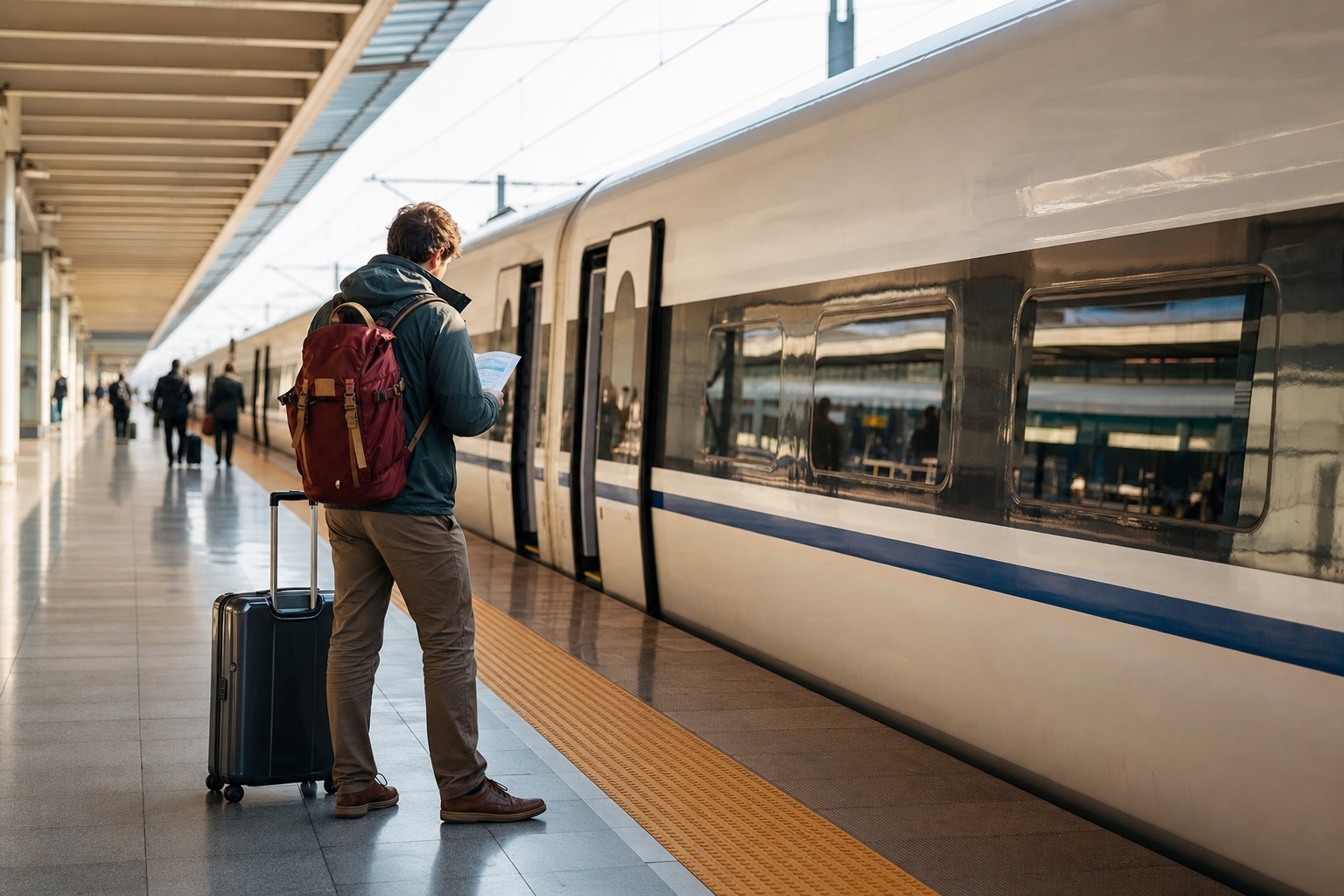
12306, Klook, Trip.com or a station counter?
Use China Railway’s official English website to start a direct booking. Other platforms can offer a different payment or support route. Compare the same train, date and seat class at the final checkout; do not assume one platform always has the lowest total.
| Booking route | When to consider it | Check before paying |
|---|---|---|
| 12306 | Your account, passenger details and payment are working. | Exact stations, identity status, fare and order conditions. |
| Klook | You prefer its checkout and available payment methods. | Full total, ticket-issuance status, cancellation terms and any service charge. |
| Trip.com | You prefer its booking flow or support. | Booking fees, optional extras, issuance status and change/refund rules. |
| Staffed station counter | Online identity checks have blocked the booking. | Bring the original passport; ticket availability and queues still matter. |
Trip.com’s train refund policy says its booking fee is non-refundable and handling deadlines depend on the booking method. Klook’s rail page directs customers to the conditions shown for their route. Neither a third-party checkout nor a pre-booking request guarantees a seat on a sold-out train.
1. Register on the English site or switch the app to English
The official English registration form accepts foreign passports and has an email field. The blank form below was captured on September 27, 2026. The form uses email and does not ask for a mainland mobile number.
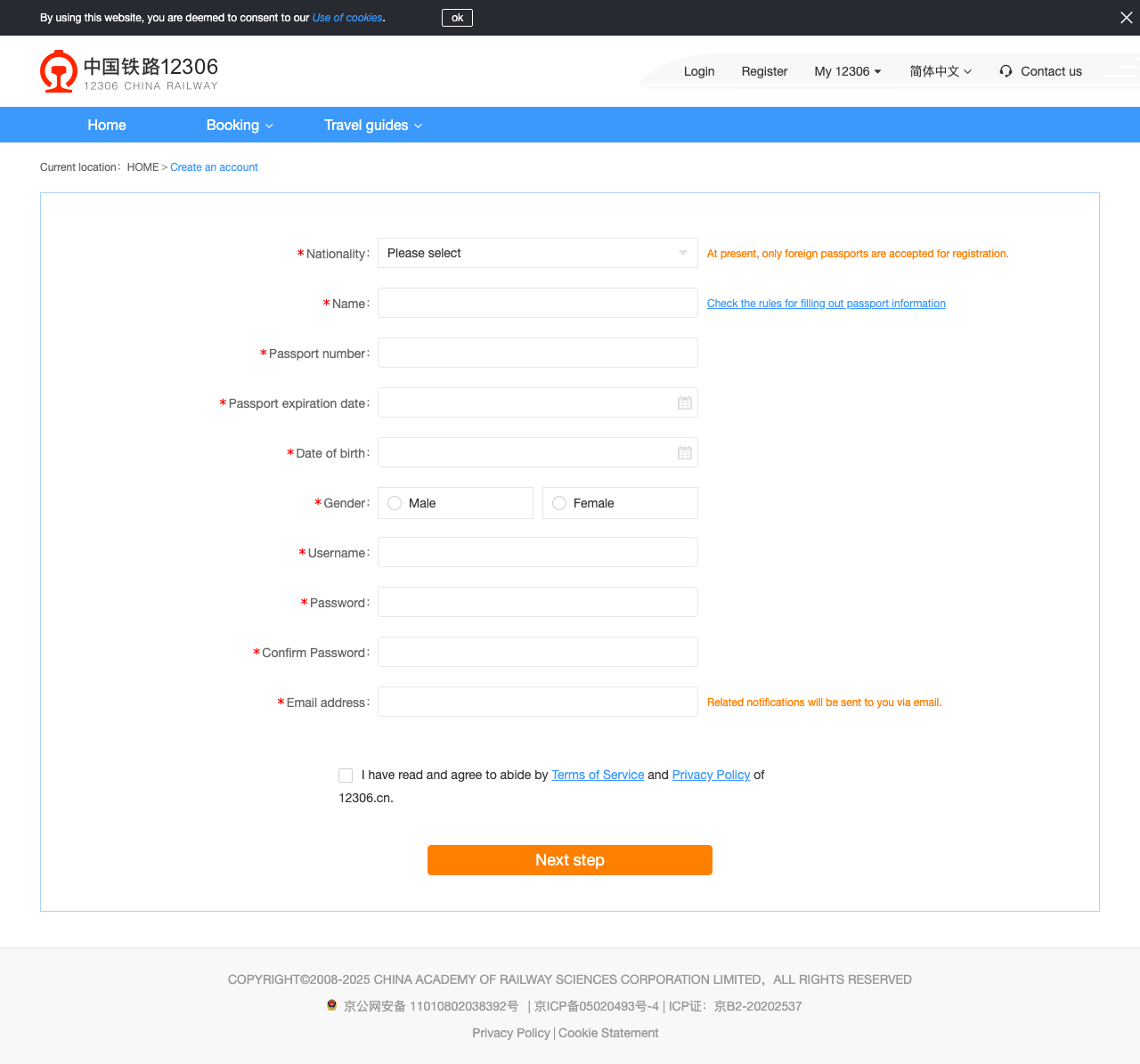
Enter the nationality, name, passport number and expiry date from the document you will travel with. Use the form’s passport-name help for spaces, punctuation and long names instead of guessing a shortened version. Read the account terms before submitting your own details, then follow the email activation prompt. Account activation and passenger identity verification are separate checks.
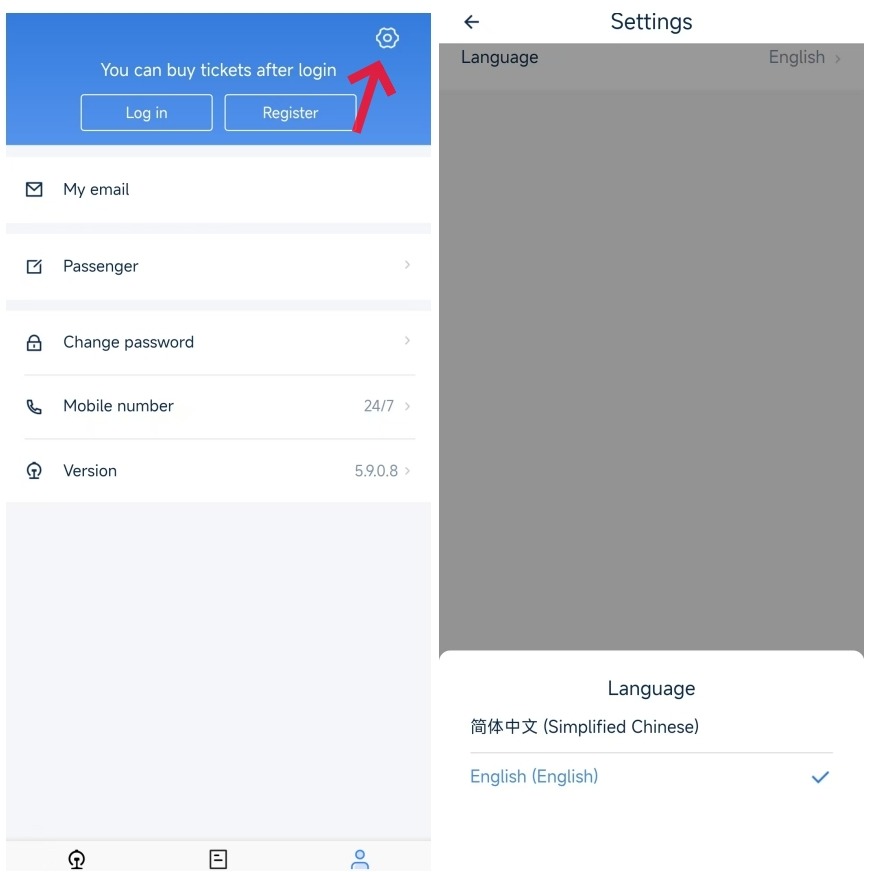
In the Railway 12306 app, look for the profile tab and its settings gear, then Language → English. The official example below shows the control. Menu positions may differ on a newer version.
If the activation email does not arrive
Check the address you entered and your spam folder. Use the account’s email-verification or resend control if the link has expired. Beijing’s official verification walkthrough documents resending from the app or website. Avoid creating repeated accounts while an existing one may simply need activation.
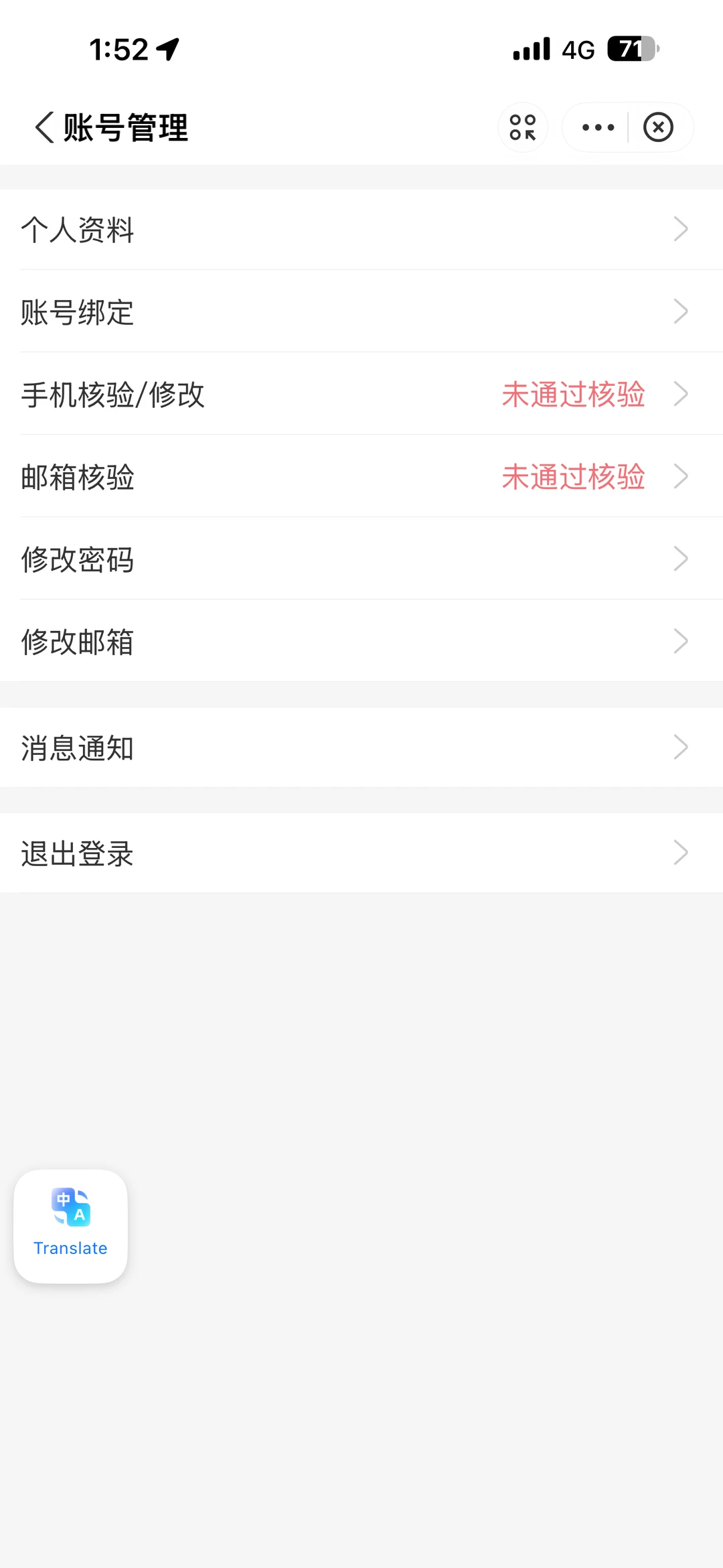
Read the row that needs attention
- 邮箱核验 means email verification.
- 手机核验/修改 means mobile verification/change.
- 未通过核验 means that check has not passed.
The image is a Chinese mini-program example, not the English registration form. An email-verification message does not by itself mean your passport was rejected.
Some community posts describe retrying from Alipay's Railway 12306 entry. That is an account-specific workaround, not a guaranteed fix. Start with the official resend options; do not place a test order just to trigger a message.
2. Check your passport details and add each passenger
Open My 12306 → My passengers on the English website, or the app’s Passenger section. Add every traveler using the passport they will carry. One account can manage other passengers; they do not all need separate accounts just because they travel together.
If verification fails, check the name and document fields before resubmitting. Follow the displayed upload requirements, or take the original passport to a staffed railway ticket counter. The official walkthrough distinguishes the account holder’s verification from an added passenger’s verification; their photo requirements can differ.
A passport information-page photo means the whole bio page, not a portrait photo of your face. If the screen separately requests a photo of you holding the passport, supply that as the additional item through the official verification flow. Keep text readable and page edges visible. Do not send passport images to people offering an unofficial shortcut.
Check the status for each passenger as well as the account holder. Pending-check labels differ between official interfaces. If your current flow blocks booking, follow its help prompt or seek assistance at a staffed counter. Allow time for any manual review.
3. Search the actual station pair, then read the result
Enter the departure station, arrival station and travel date. Use station names rather than assuming all results in the same city leave from the same place. Shanghai Hongqiao, Shanghai Railway Station and Shanghaixi are different stations.
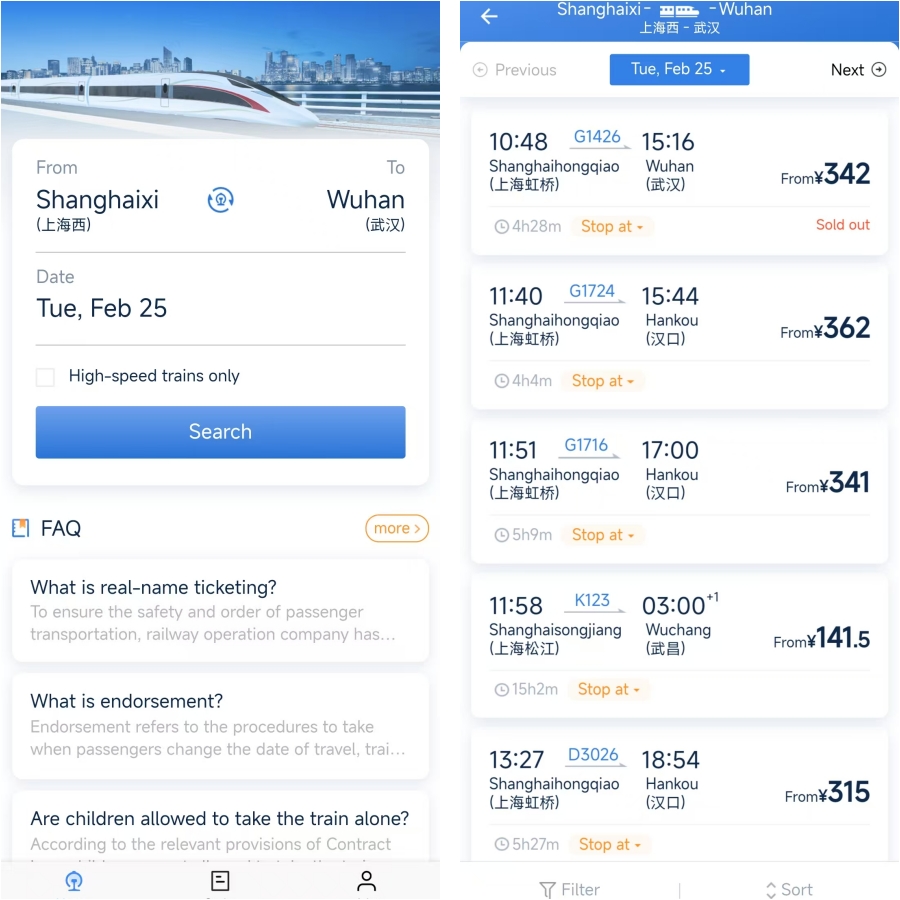
Before proceeding, compare the train number, both station names, departure date/time, arrival date if overnight, and seat class. Include the journey to the departure station and onward travel from the arrival station when comparing routes.
The railway’s published advance-sales window is 15 days, including today. Check your departure station’s current release time in 12306; there is no single release hour for every station. Third-party platforms may accept requests earlier than railway sales open. Those requests still need tickets to be issued.
If the train is sold out
Try another departure time, travel date or seat class that actually fits your trip. Where your 12306 flow offers a waitlist, read its payment, fulfillment and cancellation terms; a waitlist is not an issued ticket. Do not assume every English or mini-program view has identical functions.
Check the whole journey before choosing a different station or a connecting route. Avoid an itinerary that only works if a tight connection succeeds, or one for which you have only secured the first leg.
4. Pay, then confirm what was actually issued
Review all passengers, the station pair, travel date, class, full charge and refund conditions before paying. Use the payment options offered for that order. A card saved in Alipay does not prove it can pay every rail order; see our Alipay guide for setup and our payment backup guide if it fails.
After returning from the bank or wallet, reopen the booking. Use this checklist rather than treating the payment notification as the end:
| Order stage | What to check | What to do next |
|---|---|---|
| Unpaid / awaiting payment | The order still exists and its own timer is valid. | Pay that order through an available method, or let its displayed terms guide cancellation. |
| Processing / pre-booked / waitlisted | The seller has not confirmed ticket issuance. | Monitor the order and its deadline; contact the seller if necessary. |
| Issued / completed | Traveler, train, date, station pair and reserved seat details are correct. | Save the railway booking reference and trip details for station help. |
| Failed / cancelled / refund pending | Any bank charge and the seller’s refund status agree. | Resolve the original order before purchasing an overlapping replacement. |
These are explanatory categories, not identical labels used by every app. Klook uses My Bookings, with Processing and Completed statuses. Its rail page says direct ticket changes are currently unavailable and directs travelers to the route’s change/refund terms. Check the final total rather than expecting a fixed service fee, and treat seat preferences as requests. Klook rail booking information.
Fix the problem at the stage where it happened
| Problem | First action | Avoid |
|---|---|---|
| Activation email missing | Recheck address/spam; use the official resend control. | Creating many accounts or ordering a ticket to force an email. |
| Passport image rejected | Read which document/photo is requested and resubmit clearly through the official flow. | Uploading a portrait where a whole passport page is requested. |
| Passenger blocked from booking | Inspect that passenger’s exact identity status and help prompt. | Assuming the account holder’s verification covers everyone. |
| Payment declined, order still unpaid | Check the order timer and bank authorization; use a supported alternative if offered. | Repeating payment on an expired order. |
| Bank charged, no issued ticket | Compare order status with the payment receipt and contact the booking channel. | Buying again before resolving the first order. |
| Sold out / request pending | Compare suitable alternatives and monitor any active request. | Treating a pre-booking payment as a reserved seat. |
| Passport rejected at the gate | Show the original booking passport and reference to staffed-lane personnel. | Concluding that the ticket is invalid from one scanner failure. |
5. Travel with the original booking passport
For a railway e-ticket, carry the original passport used for booking and keep the confirmed trip details available offline. If an automatic reader does not work for your document, use the staffed lane marked 人工通道 or ask station staff. A printed itinerary or reimbursement document does not replace the boarding ID.
Allow time for station access, security, document checks and finding the gate. For an unfamiliar major station, 45–60 minutes is our planning suggestion, not a railway guarantee or a universal gate deadline. Add time for holidays or unresolved document problems. Check the station display for when your gate closes; departure time is not the time to reach the building.
If you miss the train, ask the original booking channel or station staff about the available change options immediately. Do not assume the same ticket is valid on the next departure.
Use a route guide before choosing stations
| Your journey | What the linked guide helps you check |
|---|---|
| Shanghai → Suzhou | Which Suzhou station fits the gardens and your onward trip. |
| Shanghai → Hangzhou | Station choice and travel from the station to West Lake. |
| Beijing → Xi’an | Beijing West, Xi’an North and the transfer into Xi’an. |
| Kunming → Dali → Lijiang | Separate rail legs and station-to-town transfers. |
Need a car to the station? Set up DiDi before travel and enter the specific railway station, not just the city.
Changes, refunds and a wrong-name booking
Start from the original order and read the amount to be returned before confirming a cancellation. Railway rules and platform service charges are separate. Availability on a replacement train is also separate from your right to request a refund. Contact the booking channel promptly if passenger details are wrong; do not travel hoping a mismatch will be ignored.
The 12306 English FAQ describes a limited accidental-purchase refund provision: one eligible order per registered user per day, within 30 minutes of purchase and at least four hours before departure, through official 12306 channels. It excludes categories including waitlisted, pre-ordered, group and rebooked tickets. Do not apply it to every third-party booking. Read the complete current eligibility rules before relying on it.
For reimbursements, keep accounting paperwork separate from boarding. Shanghai’s current guide says paper reimbursement vouchers are generally no longer issued for trips after October 1, 2025. Check the current invoice process for your ticket and company requirements; older instructions about collecting a paper voucher are not a universal requirement.
Quick answers
Is 12306 the official platform?
Yes. Start from the linked 12306 English site when you want to book directly with China Railway.
Does every traveler need a separate account?
No. An account can manage other passengers. Each traveler still needs the correct identity information and a status that permits the booking.
Do I need a Chinese phone number?
The current English website registration form uses email. Follow that flow’s activation instructions; phone requirements can differ in other entry points.
Does a payment receipt mean I have a seat?
Check ticket issuance in the order, along with the date, stations, train and reserved seat details. Processing, pre-booked or waitlisted is not the same as issued.
Sources and screenshot notes
Checked September 27, 2026. The registration image is our capture of the blank official public form. Two app illustrations are from Shanghai’s official guide; one account-menu example is from Xiaohongshu. Original images and existing annotations are retained. These are instructions and interface examples, not evidence of a ride, passport verification or payment completed by us.
- 12306 English website and registration: current form and labels.
- 12306 English FAQ: e-tickets, boarding documents and refund eligibility.
- Beijing Foreign Affairs Office verification walkthrough: account versus passenger checks; an older illustrated guide, so follow your current prompts.
- Shanghai International Services train guide: app examples, stations and current voucher guidance.
- Klook China rail and Trip.com refund conditions: platform-specific checks.
Community reports helped identify email-activation and passport-photo misunderstandings. They are examples of individual experiences, not proof that a workaround succeeds for every traveler.