Payments in China
Alipay for foreigners: set up and pay
Set up Alipay before China: overseas phone registration, eligible cards, passport checks and QR payments, with illustrated steps, the CNY 200 fee rule and fixes for declined payments.

Before you start
Have your own phone number, passport and eligible bank card ready. Keep access to the number your bank uses for approvals, too: it may differ from your Alipay number. A data-only travel eSIM does not receive SMS sent to your home number. Arrange both mobile data and access to bank approvals before departure.
Install Alipay, the mainland wallet described here, from your device’s app store. AlipayHK and other home-country partner wallets have different setup paths. Use the language options available in your version; an English wallet interface does not make every third-party mini program English.
1. Register with your phone number
Select your phone number's country/region code, enter the number, review the terms and follow the verification prompt. The +355 in the example is a sample; replace it with your own code.
If an SMS does not arrive, check the country code, signal and your carrier's message restrictions. Wait for the on-screen resend timer. Do not keep creating accounts to get around a failed code.
Ready to continue: you can sign in and reach the home screen. This confirms registration, not card acceptance.
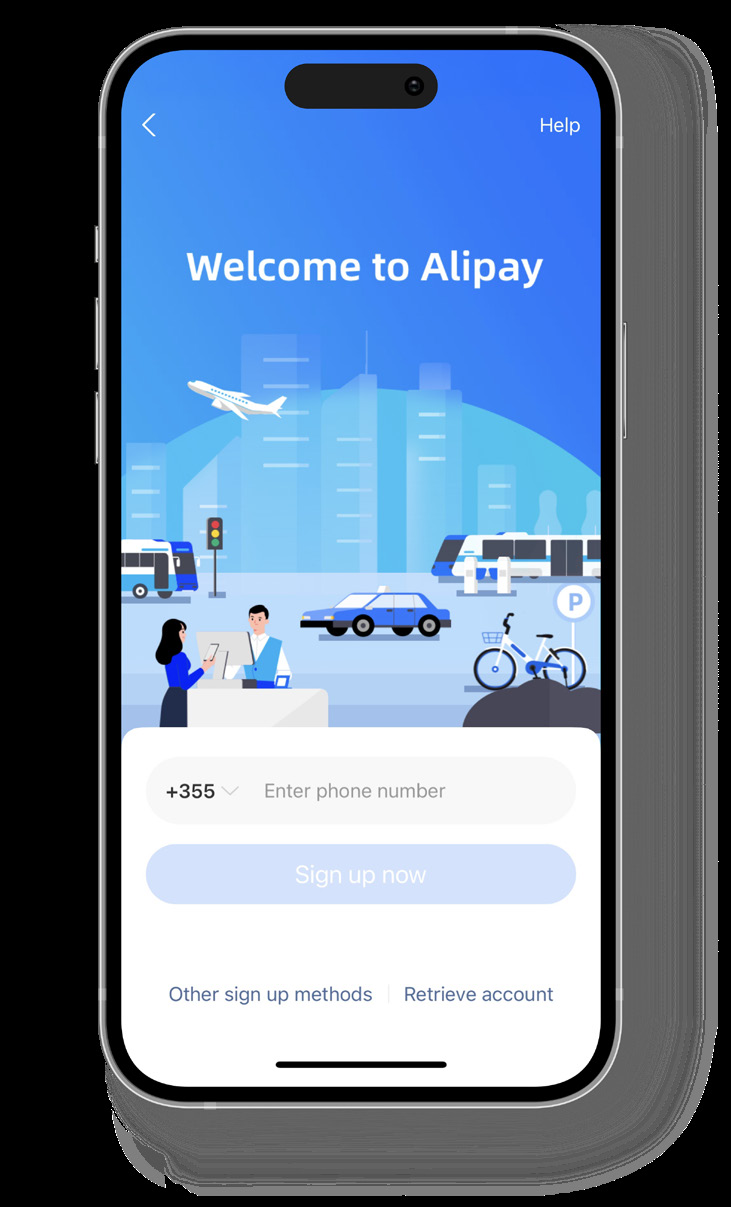
2. Add an eligible overseas card
- Open Me → Bank Cards, then the add-card option. Some versions also show Add now on the home screen.
- Enter your own card details and follow the issuer's approval request. Security-code length and location depend on the card.
- Check that the saved card is available as a payment method. Keep a second card from another issuer if you have one.
Visa, Mastercard and other networks appear in the published add-card screen, but an issuer or card product can still be ineligible. Debit versus credit, or a Wise/Revolut brand name, does not guarantee acceptance.
American Express is no longer a blanket “no”. Eligible Amex-issued cards can be linked; the official announcement excludes third-party-issued Amex cards outside mainland China. Check your issuer and the current app prompt. Alipay announcement.
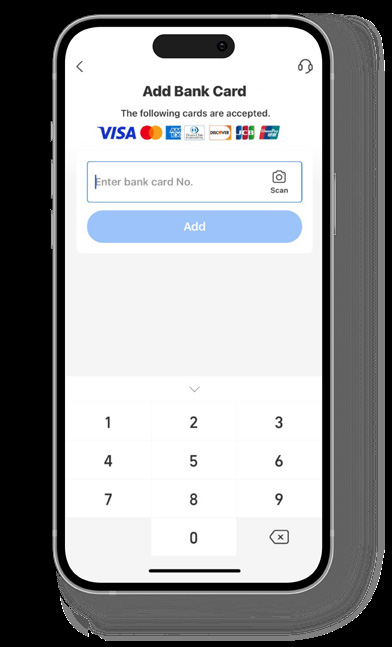
3. Resolve any passport-verification request
Follow the identity request shown in your account. Choose the correct document type and country, and copy your details from your passport into the matching fields. Submit a clear image only through the official app flow; complete any additional check it requests.
Registration, card approval and identity verification are separate checks. Do not assume every visitor must upload a passport before the first small purchase, or that successful verification makes all services available. Requirements and limits depend on the account and transaction. Prepare your passport before travel so a later request does not catch you without it.
If a screen demands a mainland bank card or says the account is restricted, keep the exact error message and contact Me / Account → Help Center. Do not switch document type to a Chinese ID or enter invented details. The Amex FAQ documents the support route and verification requirements for its eligible cards; it is not a universal approval-time promise.
4. Pay at a shop: choose the right QR flow
| At the counter | What you do | Check before leaving |
|---|---|---|
| The cashier scans your phone | Open Pay / Receive (sometimes Pay / Collect), activate the payment function if prompted, then display your payment code and select an eligible funding card. | Amount, funding card and the completed transaction. |
| The shop displays its code | Open Scan, scan the merchant’s code, enter the agreed amount if requested, then review the recipient, card and fee before confirming. | A successful merchant payment, not merely a scanned code or pending order. |
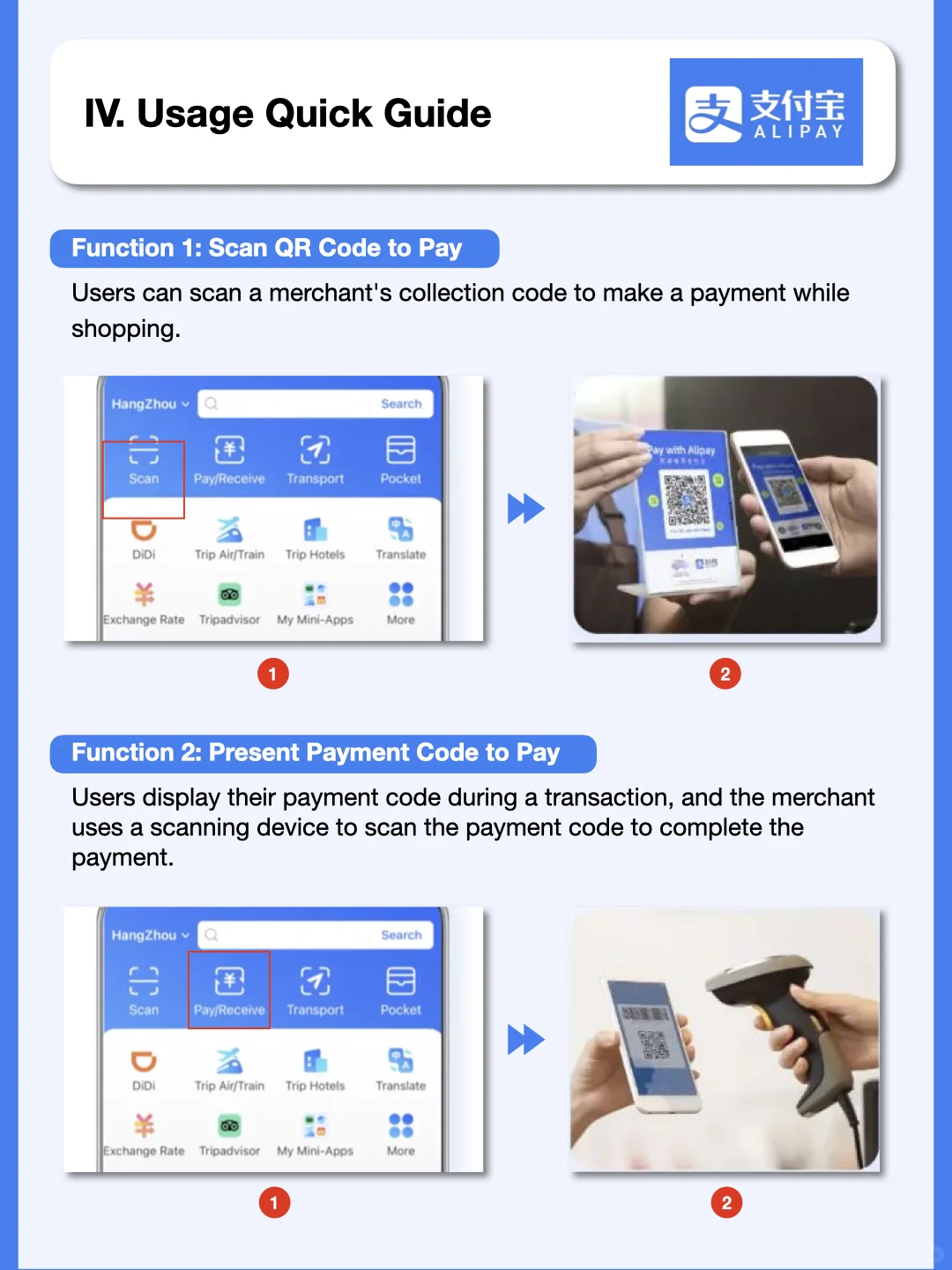
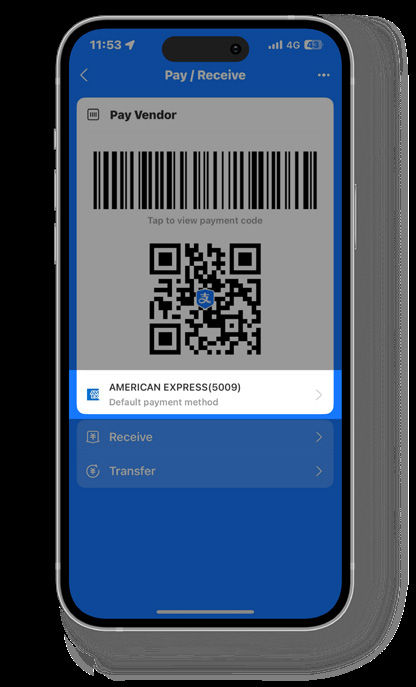
The comparison image comes from a published community tutorial; the card-selection screen is from an Amex corporate-card guide. Neither is our own live payment test. The card example is specific to that guide. Use your own current code at checkout; do not use a saved screenshot or the code shown here.
A QR code is not automatically a supported merchant payment. If scanning opens a person-to-person transfer, a balance top-up or an unsupported payment method, a linked international card may not be usable. Ask the merchant whether they can take an international-card-funded Alipay payment or scan your payment code. Changing the scanning direction cannot make an unsupported merchant eligible.
5. Test one small purchase after arrival
At a staffed shop, buy something you actually need, review the payment result and check the transaction record. If the result is unclear, ask the cashier to confirm before trying again. Completing setup abroad does not prove a mainland merchant purchase will succeed.
For a first journey, check DiDi’s ride and payment steps or the 12306 train-booking guide separately. Each service has its own order status; Alipay confirmation alone is not proof that a train ticket has been issued. A metro ride code is also a separate activation flow, not your ordinary shop payment code.
Fees: CNY 200 or less versus more than CNY 200
The published standard for linked international-card QR payments waives the platform service fee at CNY 200 or less and charges 3% of the whole transaction above CNY 200, not just the excess. Check the actual checkout: card-specific terms or promotions may differ. Official fee guidance.
| Purchase | Standard platform fee | Total before issuer charges |
|---|---|---|
| CNY 180 | CNY 0 | CNY 180 |
| CNY 200 | CNY 0 | CNY 200 |
| CNY 300 | CNY 9 | CNY 309 |
These are calculations, not payment screenshots. Your bank’s exchange rate and foreign-transaction charge are separate. A card advertised as having no foreign-transaction fee does not automatically waive Alipay’s fee. For refunds, inspect the app’s refund breakdown and your card statement; exchange-rate differences can affect the amount returned in your home currency.
Payment failed: check the message before retrying
| What you see | What to check next |
|---|---|
| Registration code missing | Country code, the registered SIM and incoming SMS; this is not a card-decline problem. |
| Card cannot be added | Card details, eligibility and any issuer approval. Ask the issuer about the rejected authorization; try another eligible card if available. |
| Passport check or account restriction | Correct document type and exact passport details. Follow official Help Center instructions; do not assume a guaranteed review time. |
| Card saved, but unavailable for this payment | Recipient/merchant support and the type of transaction. A transfer or mini program may have different rules. |
| Bank declines the purchase | Check the bank app and issuer message, online/international-payment settings and available funds. Alipay cannot override the issuer. |
| Debit shown, order still pending | Check both transaction history and the merchant’s order. Confirm its status before another payment. |
| No signal or flat battery | Use a physical fallback. Do not depend on being able to open a new code offline. |
Stop repeated attempts when the same error persists. For Alipay account issues use in-app support; for an issuer refusal contact your bank. If support requests card proof, follow the official submission flow and its masking instructions. Never send a one-time code, payment password or a full card image to a stranger offering to unlock the account.
What a linked card does not solve
The current Shanghai visitor guide publishes maximums of US$5,000 per transaction and US$50,000 a year for international-card mobile payments. These are published ceilings, not a promise of your account’s available limit. Account checks, issuer limits and merchant eligibility still apply.
Do not plan to fund transfers to friends, red packets or wallet top-ups with your international card. Receiving money or spending a wallet balance is a separate feature with its own eligibility. You do not need an old Tour Pass top-up tutorial for the direct-card route described here.
WeChat Pay can be another option, but the same bank card can fail in both wallets. Keep a physical card and small RMB notes as well. Use the payment-backup guide for choosing alternatives by situation, the Alipay–WeChat comparison for wallet choice, and the cash guide for withdrawals and cash planning.
Sources and image scope
Reviewed September 28, 2026. This is a researched setup guide; we have not completed a live payment test for this update. Screens are original published examples, and menu labels may differ by app version.
-
American Express: illustrated Alipay guide, source of the registration, add-card and funding-card examples.
-
American Express: eligibility, verification and Help Center FAQ.
-
ExploreChinaNow探索中国: published Scan / Pay comparison, February 12, 2025. Only this interface comparison is reproduced; the note’s other claims are not our rule source.
Affiliate link — we may earn a commission at no extra cost to you. Booking is completed on Klook.