Getting online
WhatsApp in China: the connection matters more than the app
WhatsApp is blocked on normal mainland networks. See which travel eSIM setup can work, what hotel Wi-Fi changes, and how to fix messages that stop sending.
If WhatsApp sends on mobile data and stalls as soon as you join hotel Wi-Fi, the app has not suddenly broken. You changed networks. This guide starts with that distinction, then covers the other foreign apps a traveler is likely to need.
What’s blocked in China — the 2026 list
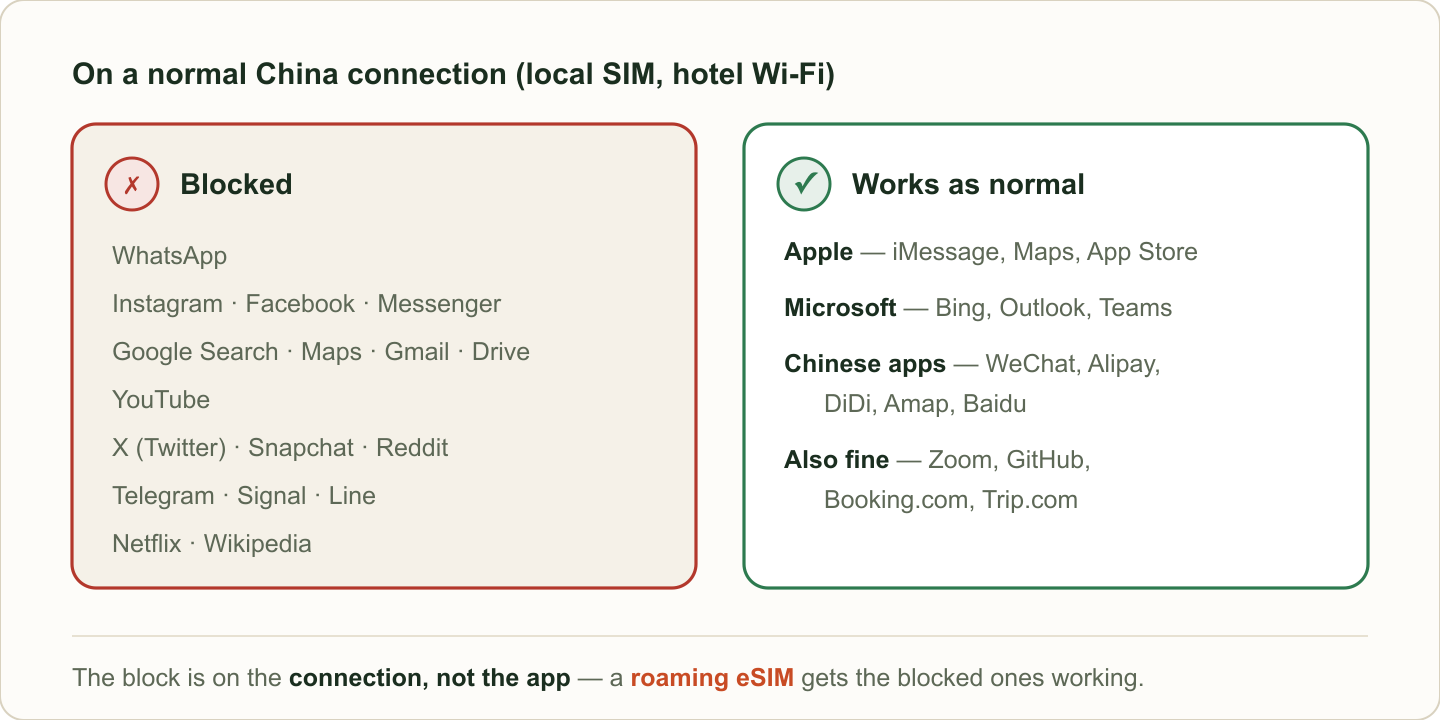
China’s “Great Firewall” blocks foreign services at the network level, so what matters isn’t the app, it’s the connection you’re on. On a local Chinese SIM, public Wi-Fi or hotel internet, this is the picture as of 2026:
| App / service | On a normal China connection | The everyday workaround |
|---|---|---|
| ❌ Blocked | Roaming eSIM | |
| ❌ Blocked | Roaming eSIM | |
| Facebook / Messenger | ❌ Blocked | Roaming eSIM |
| Google Search | ❌ Blocked | Roaming eSIM, or use Bing |
| Gmail | ❌ Blocked | Roaming eSIM |
| Google Maps | ❌ Blocked and inaccurate | Use Apple Maps or Amap |
| Google Drive / Photos / Play | ❌ Blocked | Roaming eSIM |
| YouTube | ❌ Blocked | Roaming eSIM |
| X (Twitter) / Snapchat / Reddit / Pinterest | ❌ Blocked | Roaming eSIM |
| Telegram / Signal / Line | ❌ Blocked | Roaming eSIM |
| Netflix | ❌ Not available | — |
| Wikipedia | ❌ Blocked (all languages, since 2019) | Roaming eSIM |
| Apple services (iMessage, App Store, Apple Maps) | ✅ Generally available | Individual features can vary |
| Bing, Outlook, Microsoft Office / Teams | ✅ Usually works | — |
| GitHub, Zoom, Amazon, Booking.com, Trip.com | ✅ Usually works | — |
| WeChat, Alipay, DiDi, Amap, Baidu | ✅ Available on mainland networks | — |
Google and Meta services need a suitable roaming route or another tested connection. Chinese travel apps load on mainland networks; Apple and Microsoft services are generally easier to reach, although individual features can differ.
Can I use WhatsApp in China?
Not through a normal mainland Chinese SIM or ordinary hotel Wi-Fi. Messages can remain on the clock icon, media can stop downloading, and calls may not connect even though Chinese apps still load.
A travel eSIM often works when its data is carried as international roaming and exits through a gateway outside mainland China. Do not assume every product sold as a “China eSIM” does this. Before paying, check the product page or ask support whether WhatsApp and Google work in mainland China without a separate VPN.
The useful distinction is the route taken by the data:
| Connection | Likely WhatsApp result | What to check |
|---|---|---|
| Mainland SIM or locally routed mainland eSIM | Blocked | Useful for local calls/data, not open-internet access |
| Hotel, airport or café Wi-Fi | Blocked unless you add a working tunnel | The Wi-Fi login page may work while WhatsApp does not |
| International roaming from your home carrier | Often works | Roaming price, speed cap and included mainland-China data |
| Travel eSIM with overseas routing | Often works | Explicit mainland coverage, overseas routing and hotspot policy |
Keep WhatsApp registered to your existing number. A data-only travel eSIM does not give you a new WhatsApp identity, and there is usually no reason to delete or re-register the app when you change the data line.
Can I use Google in China? (Search, Gmail, Maps, Drive)
No — the whole Google ecosystem is blocked: Search, Gmail, Maps, Drive, Photos, Calendar and the Play Store. Two consequences worth planning for:
- Android users: the Play Store won’t load, so download every app you need before you fly. Updates and new installs are painful in-country without a workaround.
- Email: if your account is Gmail, set up your roaming eSIM, or add your Gmail to Apple Mail / Outlook before arrival as a fallback, since those mail apps fare better than the Gmail app itself.
If you’d rather not bother, Bing works for quick searches without anything special.
Can I use Google Maps in China?
Google Maps combines two problems. Access is blocked on a mainland connection, and its mainland-China map data can be offset or incomplete even when the app loads through roaming. Use a current local map for navigation:
- iPhone: use Apple Maps, which works natively and is accurate in China.
- Android: use Amap (Gaode) in English or Baidu Maps.
Save Google Maps for the trip-planning you do at home.
Can I use Instagram, Facebook and X in China?
Instagram, Facebook, Messenger, Threads, X, Snapchat, Reddit and Pinterest are blocked on normal mainland connections. If you need them during the trip, confirm the roaming route before departure and test again after landing; hotel Wi-Fi is not a fallback for these services.
Can I use YouTube, Netflix and TikTok in China?
- YouTube: blocked; works over a roaming eSIM.
- Netflix: not available in mainland China at all — there’s no Chinese Netflix, and your home account won’t stream from inside the country. Download shows offline before you fly.
- TikTok: the international TikTok doesn’t operate in mainland China. The local version is a different app, Douyin, which is Chinese-only and tied to a Chinese number — not a like-for-like replacement.
Services that are usually reachable on a mainland connection
- Local travel apps: WeChat, Alipay, DiDi, Amap and Baidu.
- Microsoft services: Bing, Outlook, Office and Teams are generally reachable.
- Apple services: iMessage, the App Store and Apple Maps are generally available, but do not assume every media or calling feature behaves exactly as it does at home.
- Travel and work sites: Trip.com, Booking.com, Zoom and GitHub are commonly reachable; save essential confirmations offline anyway.
When a roaming eSIM is the practical primary connection
A roaming travel eSIM is usually the simplest phone setup when the provider confirms overseas routing for mainland China. Keep your home line available for calls and verification SMS, then select the travel eSIM for cellular data. On iPhone, only one line supplies cellular data at a time; Apple documents this separately from the default line used for calls and messages.
Three limits to know:
- Wi-Fi can silently take priority. If WhatsApp stops in a hotel, turn Wi-Fi off and retry on the travel eSIM before changing app settings.
- Hotspot access varies by plan. Confirm tethering if a laptop or companion also needs the open internet.
- Installation can require a stable connection. Add the eSIM at home and save the QR code and provider instructions offline.
See our China eSIM guide and the Airalo vs Holafly comparison for which to pick.
VPN reliability varies
Consumer VPNs can be blocked, throttled or inconsistent on different Chinese networks. A service that connects at one hotel may fail on another Wi-Fi network or during a sensitive period. A VPN may be worth carrying as a backup, but do not make one untested tunnel the only way to reach your airline, work account or family. The full planning trade-off is in our VPN for China guide.
eSIM vs VPN vs hotel Wi-Fi — what reaches the open internet
| Roaming eSIM | VPN (on China connection) | Hotel / public Wi-Fi | |
|---|---|---|---|
| Reaches blocked apps | ✅ Usually, when international roaming is included | ⚠️ Varies by provider and network | ❌ No (behind firewall) |
| Needs setup before arrival | Yes | Yes | No |
| Works for | Your phone’s data | Whatever device runs it | Nothing blocked |
| 2026 verdict | Primary | Backup only | Local sites only |
A 60-second connection check after landing
Do this before leaving the airport:
- Turn off airport Wi-Fi.
- Open the phone’s cellular settings and select the travel eSIM for data.
- Turn on data roaming for that line if the provider instructs you to.
- Open an ordinary website, then send one WhatsApp message.
- Open Amap or Alipay as a separate test of the local apps you need for the first ride.
- If the phone has signal but no data, check the provider’s APN instructions before deleting the eSIM.
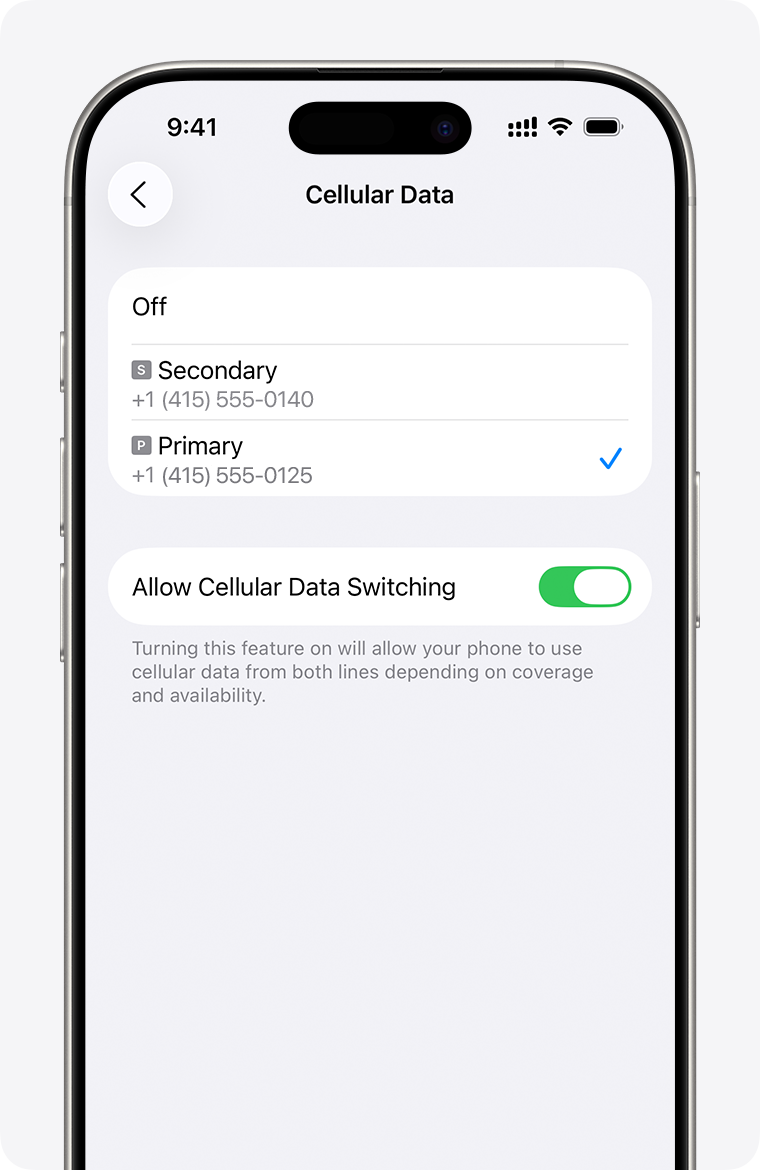
On iPhone with Dual SIM, leave the home line enabled if you need incoming SMS, but check your carrier’s roaming charges. Turn off cellular-data switching if you do not want the phone to move data back to the home line automatically.
If WhatsApp stops sending in China
Use the symptom to choose the next step:
| What you see | First check | Next action |
|---|---|---|
| WhatsApp works on eSIM data but not hotel Wi-Fi | Wi-Fi has taken priority | Turn Wi-Fi off when you need blocked services |
| No foreign or Chinese site loads | The phone has no working data | Check the selected data line, roaming toggle, balance and APN |
| Chinese apps load, WhatsApp and Google do not | Data is using a mainland route | Switch to the confirmed roaming eSIM or your tested backup |
| Messages work but calls are poor | Speed, latency or plan throttling | Test text first, move location, then ask the provider about voice/video support |
| The eSIM worked and then lost service | Network registration | Toggle airplane mode for about 30 seconds, then retry; use manual network selection only if the provider recommends it |
WhatsApp’s own troubleshooting guidance recommends trying a different Wi-Fi network or a hotspot when a network blocks its endpoints. In China, switching from hotel Wi-Fi to a working roaming data line is the most useful version of that test.
Set it up before you fly
Install the eSIM, download the apps you need and sign into essential accounts on home Wi-Fi. Save the provider’s QR code and setup guide somewhere available offline. Pair that with Alipay set up in advance so the first airport ride does not depend on completing two unfamiliar setups at once. Keep the cross-app fallback in the China travel without internet guide.
Evidence boundary
Access can differ by carrier, network and date. The page therefore avoids promising that every eSIM or VPN will work. The repeatable traveler test is to keep WhatsApp unchanged and compare hotel Wi-Fi with the confirmed roaming-data line. WhatsApp’s own help center also recommends changing networks when an office, campus or other Wi-Fi network blocks its endpoints.
Sources
Affiliate link — we may earn a commission at no extra cost to you. Booking is completed on Klook.